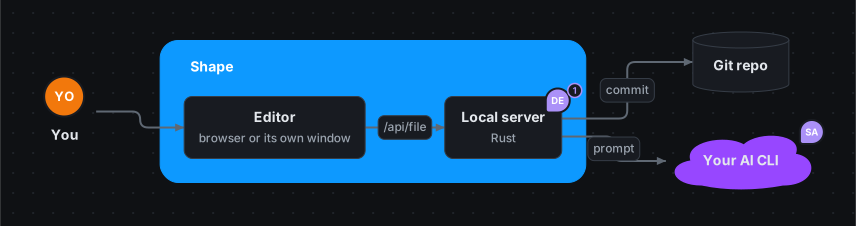
Shape is one board for the whole project. Throw in what you know (meeting notes, a Slack thread, a screenshot) and the AI you already pay for sorts it into mindmaps, plans, timelines, screens and decisions. Then show it to every audience, present it as slides, or copy it as a prompt and let an LLM build it.
brew install dobrinov/tap/shapeirm https://dobrinov.github.io/shape/install.ps1 | iexcurl -fsSL https://dobrinov.github.io/shape/install.sh | shPaste in PowerShell · more ways ↓
Free and open source
No account, no server
Runs on your Claude, ChatGPT or Gemini plan
Your board is a text file in your repo
This is the real editor, running in your browser. It is Shape’s own board. Double-click Roadmap to open the board inside it, or right-click anything.
Why teams switch to Shape
A project lives in six places: a whiteboard, a roadmap, a ticket board, a wireframe tool, a doc of decisions and a slide deck. They drift apart the day after the kick-off. Shape keeps them on one board, and lets the AI keep it current.
✦
Talk to your board
Paste what you learned and Shape puts every fact where it belongs. Ask “what blocks the launch?” and get the answer drawn, each piece linked back. After a week of comments, one click on Rethink brings the whole board up to date.
▦
Six tools, one board
Mindmaps, kanban, gantt charts that forecast, timelines, wireframes for phone and web, decision records, risk matrices, charts and slides. They sit side by side, with boards inside boards for the details.
⎇
Yours, for good
A board is a short text file. It diffs and merges like code, it works offline in its own window, and it is still readable in ten years. Collaboration is commits and pull requests, so there is nothing new to host.
How it works
1
Dump it
Write, paste or drop in what you have: notes, a list, interview quotes, a screenshot. No structure needed.
2
Shape it
The AI sorts it into the right blocks: findings into a mindmap, dates onto a timeline, work onto the kanban, an outage into a post-mortem. You see each change before you keep it.
3
Share it
Open the board through the eyes of leadership, legal or design. Present it as slides. Or copy it as a prompt and hand it to Claude, ChatGPT or your coding agent to build.
Wireframes and flows, in minutes
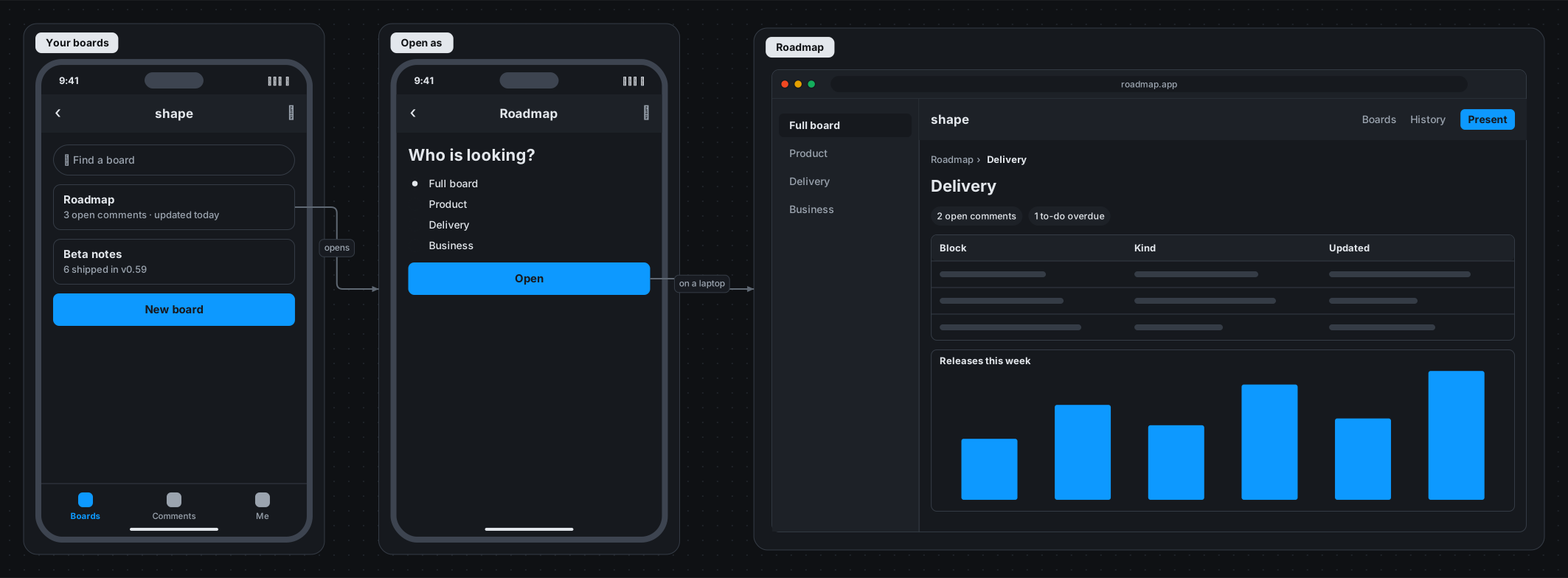
Sketch the product before anyone opens a design tool. Pick a phone, a tablet or a browser window, click components in, and draw the flow with an arrow from a button to the screen it opens. It sits on the same board as the plan, the data model and the decisions it depends on.
An idea for Shape on a phone: pick a board, choose who is looking, open it on a laptop. Three screens and the flow between them, in about 30 lines.
▭
40 components
Headers, navbars, sidebars and tab bars; fields, selects, toggles and sliders; buttons, lists, tables, cards, tabs, steppers, maps, charts, alerts and more. Select a screen and click them in, or pick one from the full list.
→
Flows, not just screens
Every button and link is its own element. Drag from one to another screen to draw where it goes; drop it on empty space and the next screen appears beside it. Screen flow starts you with three linked screens.
✎
Write it, or let the AI
A screen is a few lines of text: button submit: Sign in [blue]. Edit it as text, review it in a pull request, or tell the AI “a sign-up flow with Google” and it draws the screens.
⌘
From sketch to build
Copy the screens as a prompt and each comes out as a list of its components, with the flow between them. That is a spec a coding agent can build.
# ⌘⇧C: the board, as a spec to build from
# Build: Shape on a phone

The board below describes what to build…

## Screens

### Open as (wireframe screen, mobile: its components top to bottom)
- header: Roadmap
- title: Who is looking?
- radio: Full board | Product | Delivery | Business
- button: Open (blue)

### Connections
- Roadmap → Open as: opens
- Open → Roadmap: on a laptop

## Data & flows
### Boards (database table `boards`)
| column | type | key | references |
|---|---|---|---|
| path | text | PK | |
| theme | text | | |

## Comments
- On Open as: Remember the last perspective?
Draw the spec. Let the AI build it.
For a complex build, the best prompt is a picture of it. Lay out the system, the screens, the data model and the decisions on a board, then press ⌘⇧C. Shape writes the whole thing up as a clean Markdown spec, with every part, every arrow and every open question, ready to paste into Claude, ChatGPT, Cursor or your coding agent.
The whole board, canvases included, or just the part you select
Screens come out as their components, data models as tables with keys, flows and dependencies as arrows
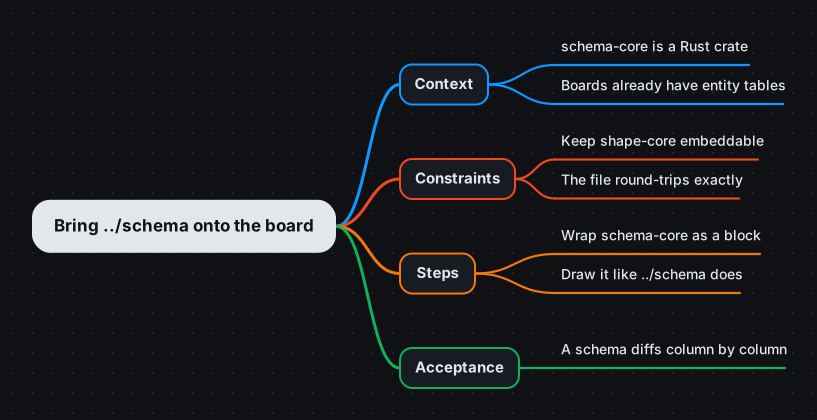
Prompt mindmaps: branch a task into Context, Constraints, Steps and Acceptance, and copy it as a task spec
Open comments become the questions the model should ask, not guess
From the terminal: shape prompt plan.shape --target build
One board, every audience
The same board tells the story differently to different people. Nobody keeps a separate copy for the board meeting.
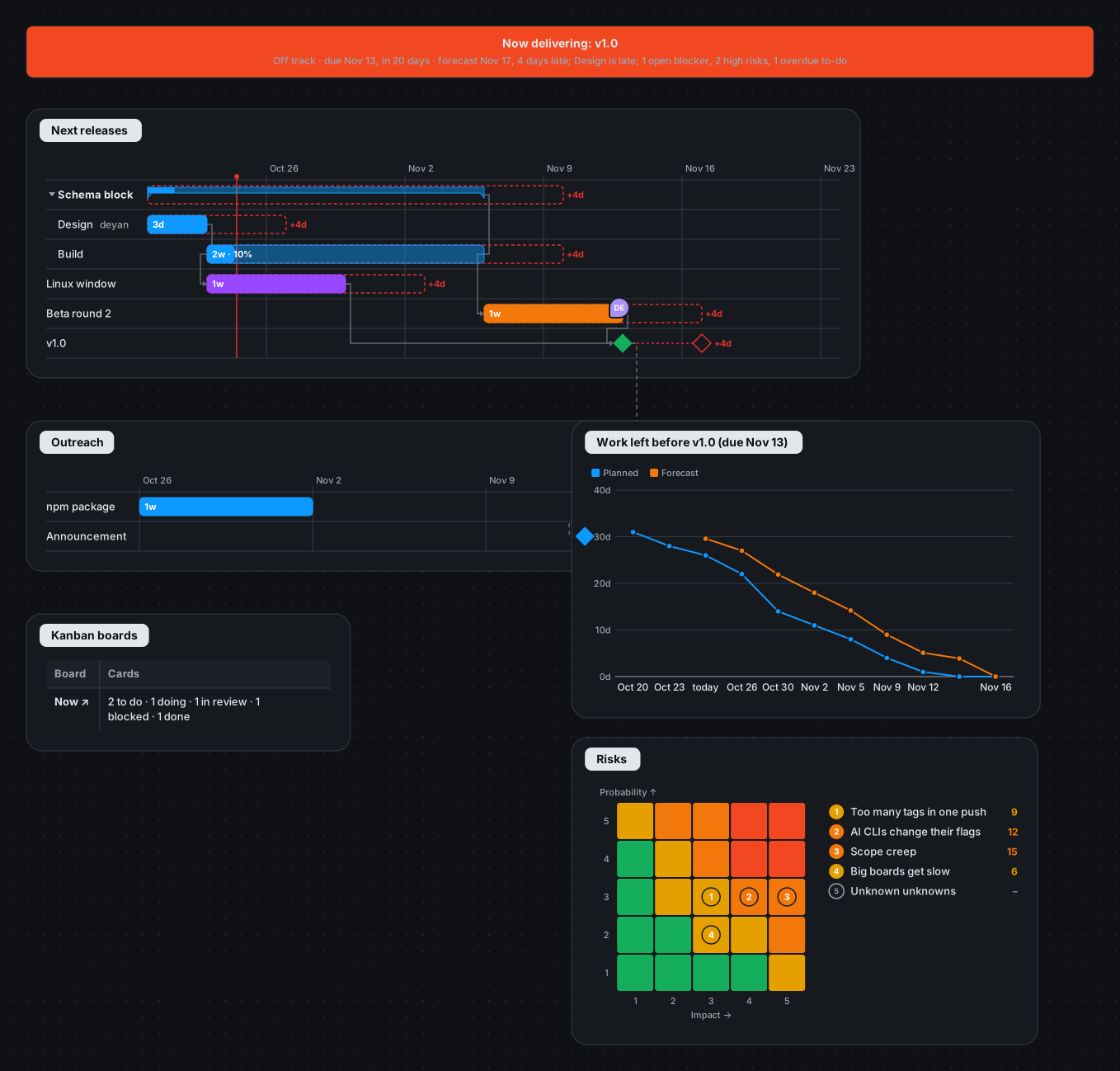
Perspectives open on a summary Shape works out from the board: Delivery sees what is being delivered now, with a traffic light and why, the burndown to its due date, the plan it depends on and the risks; Product, Marketing, Business and Design get theirs. Click any row to see what is behind it. Nothing to keep up to date.
Presentation mode: pick the sections, add speaker notes, and present. The view glides across the board from slide to slide, with no deck to keep in sync.
Wireframes: sketch phone and web screens as text and draw the flow with arrows from the buttons.
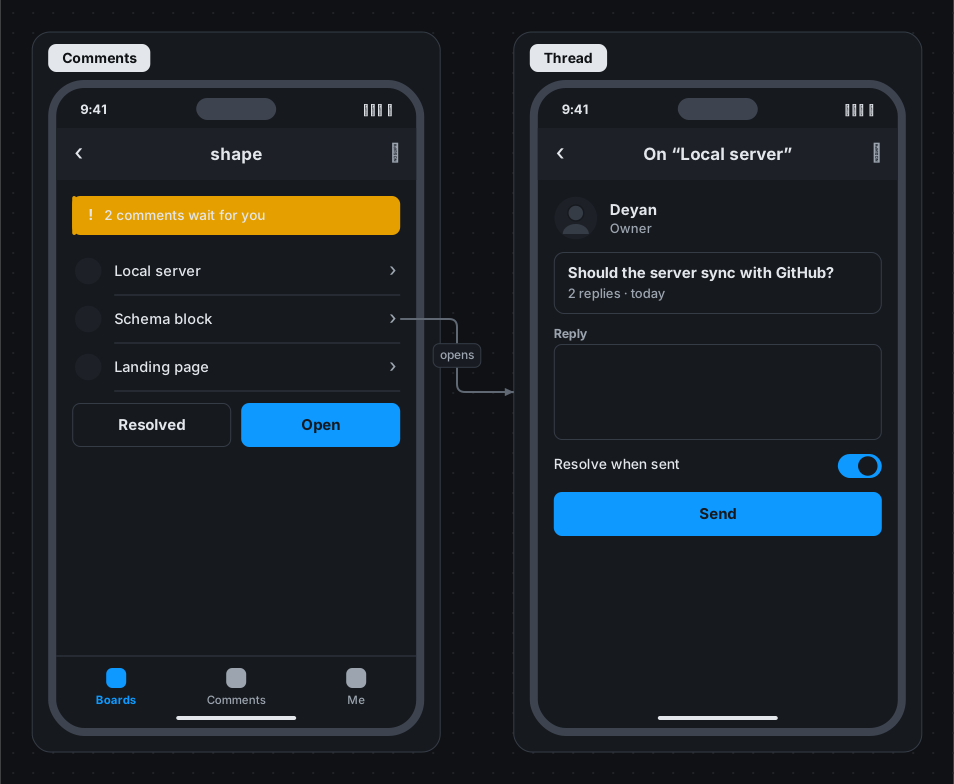
Comments with names on any box or arrow, and a full history to go back to.
Shape's own board, as Delivery sees it: what is being delivered now, is it on plan, and what it depends on.
Every block a project needs
Each picture is a few lines of text, drawn by Shape itself. Put them next to each other, or look at the example board that uses them all.
Mindmaps, and prompts as mindmaps
Type a map with Tab and Enter. Branch it into Context, Constraints, Steps and Acceptance, and “Copy as prompt” gives your coding agent a spec.
Wireframes
Phone, tablet and web screens from about 40 components: fields, buttons, lists, tabs, tab bars, maps and more. Arrows from a button make the flow.
Timelines
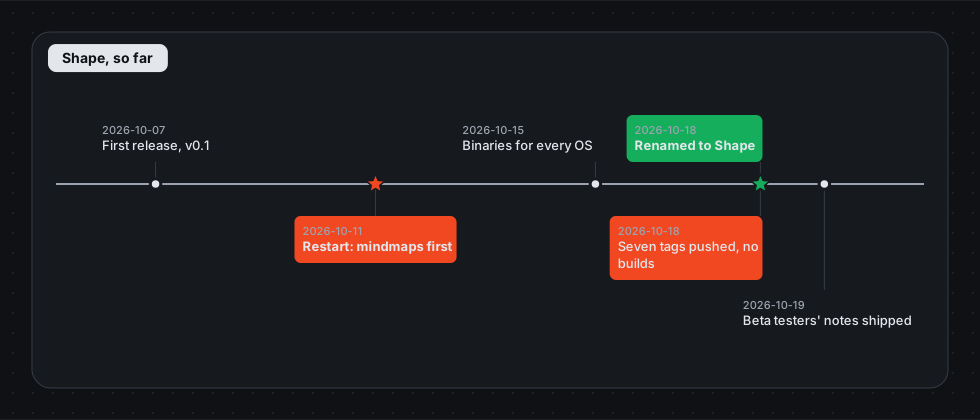
What happened when, with the moments that mattered starred. Write dates the way people say them: “Oct 2026”, “Q4”, “7–14 May”.
Kanban
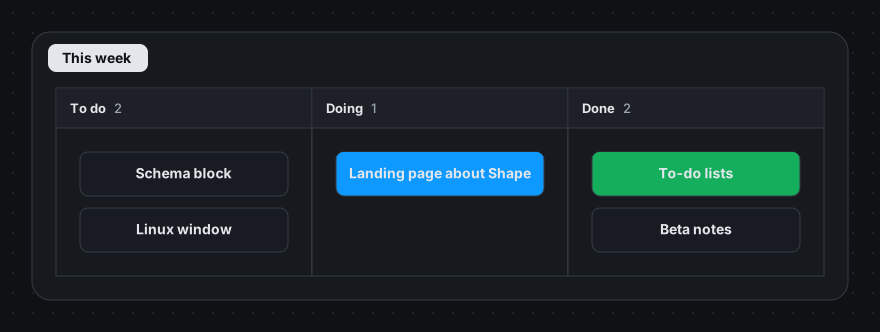
Columns of cards with owners and colours. Drag a card to move it; the file just lists the cards in order.
Gantt charts that forecast
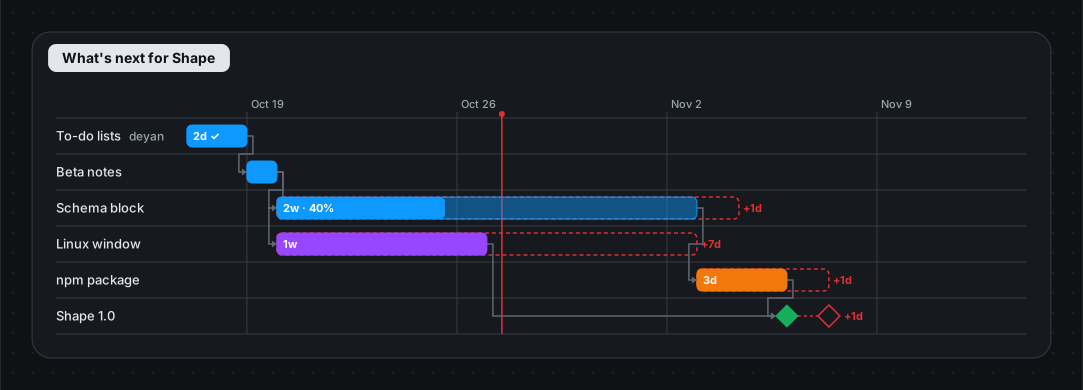
Durations, dependencies, milestones and progress. Unfinished work pushes everything after it, and slips show in red.
Cycles
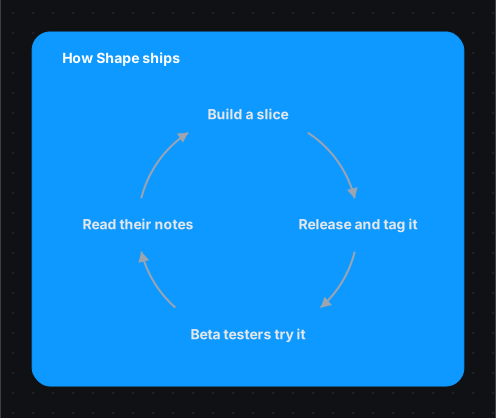
Loops that come round again: build–measure–learn, a release train, a review cycle.
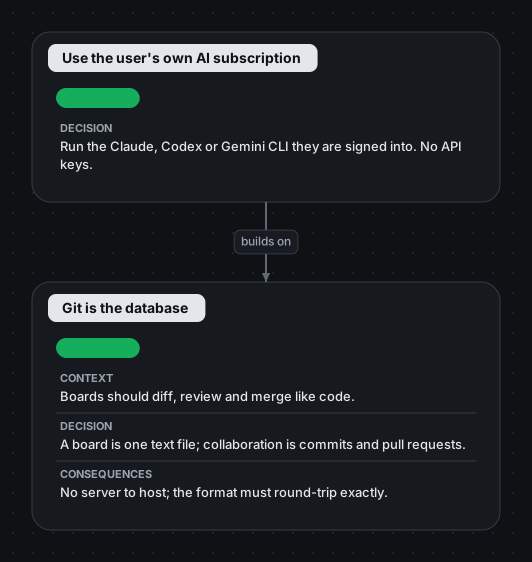
Decision records
Context, options, decision and consequences, with a status, so “why did we do this?” has an answer.
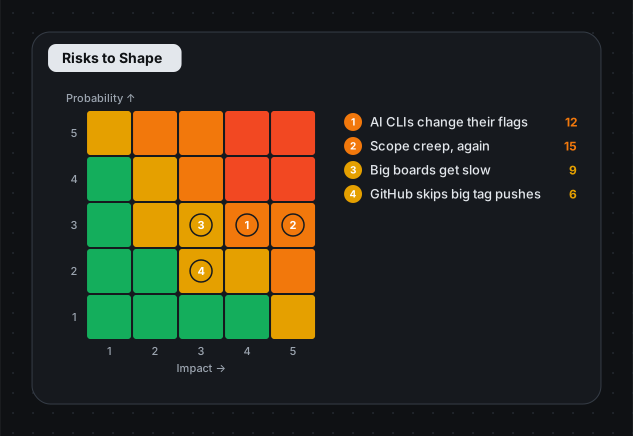
Risk matrix
Risks by probability and impact, worst first, with owners. Drag a dot to re-rate it.
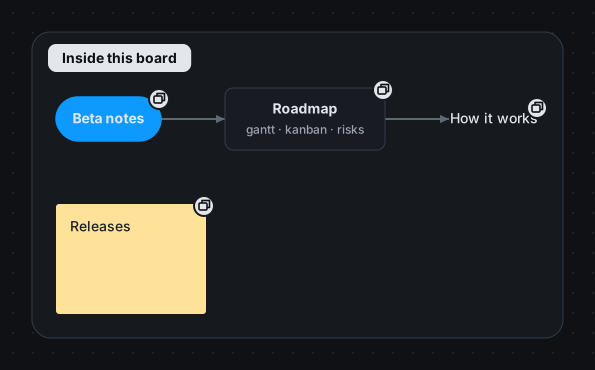
Boards inside boards
A button opens a whole board inside this one, nested as deep as you like, all in one file.
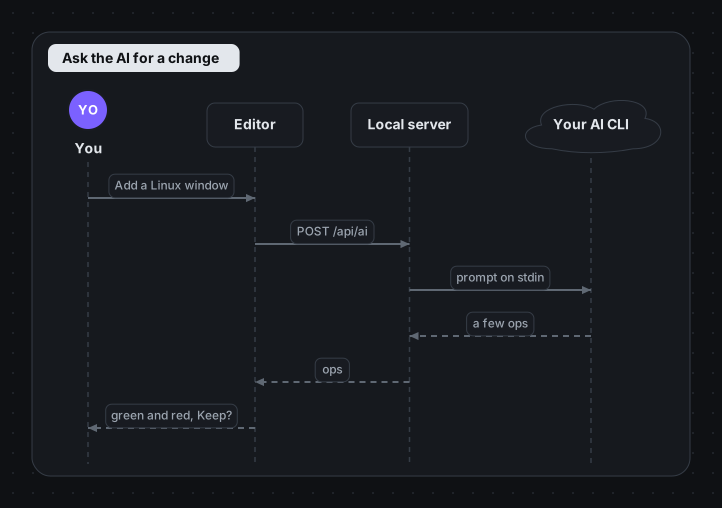
Sequence diagrams
Who talks to whom, in order, with replies and self-calls.
Database tables and schemas
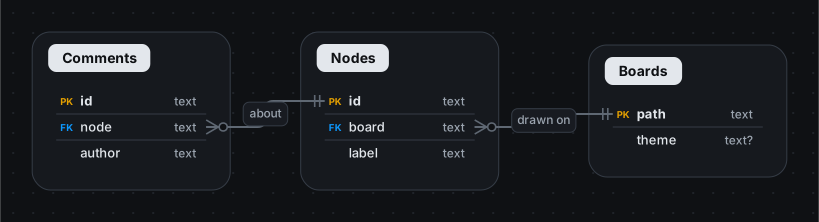
Tables, types and keys, with relationships worked out from the columns. Or read them from your structure.sql or schema.rb and keep them in step with it.
Swimlanes
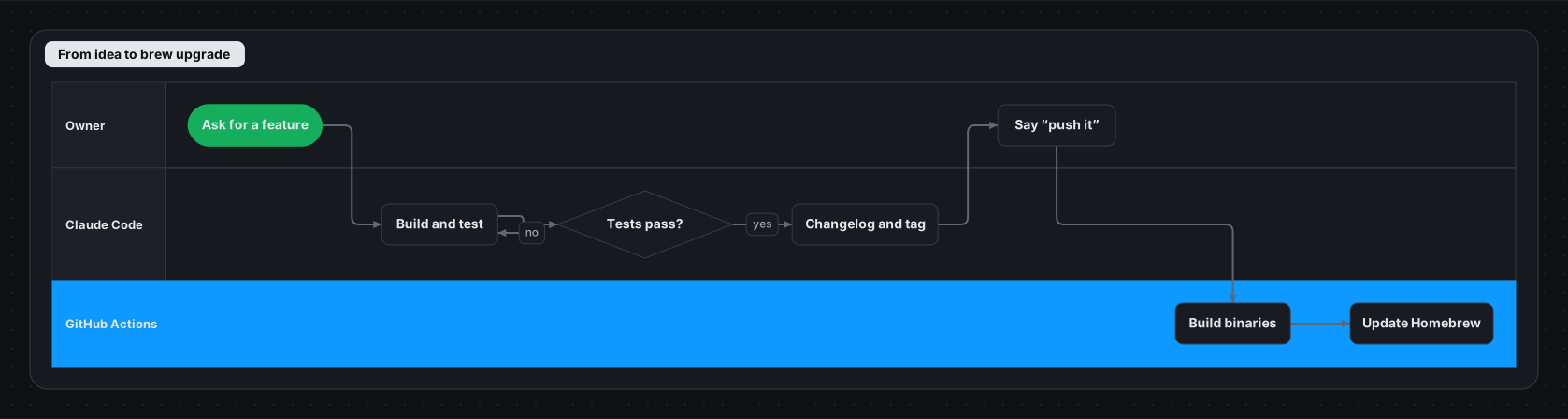
Who does each step: the flow runs across the lanes and lines up step by step.
Charts
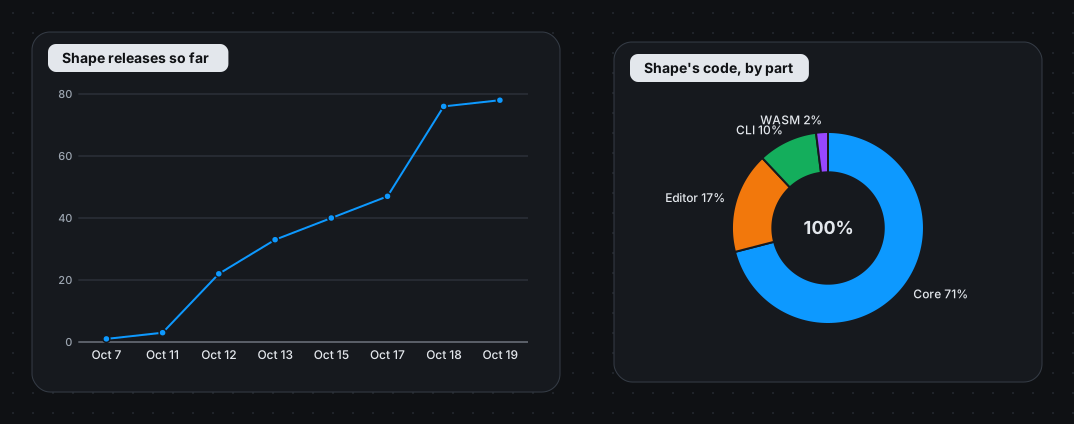
Bars, lines, areas, pie, donut and scatter, from a small table you edit as text.
Tables
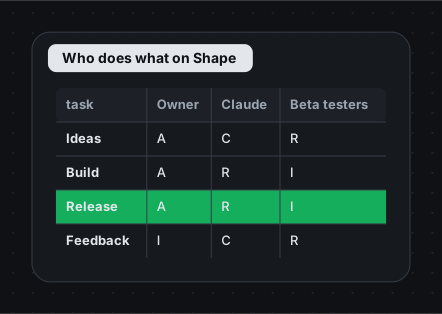
RACI charts, options and trade-offs: rows you can point arrows and comments at.
Comments
Comment on any box, arrow or spot, reply and resolve. The AI acts on open comments when it rethinks the board.
Themes, light and dark
Paper, blueprint, midnight, contrast, or your team's own colours, shared across boards.
AI on the plan you already pay for
No API keys and no new bill. Shape uses the command-line tool of the subscription you are already signed into: Claude Code, Codex or Gemini. Without one, it hands you the prompt to paste into any chat.
Add what you know (⌘K): write down details and the AI puts them in the right place, shown as a change you can keep or discard
Ask: a question about the board, answered in a few words with links to the blocks the answer comes from, and with a small diagram when a picture says it better
Rethink: acts on the open comments, merges duplicates, updates what changed and keeps every perspective filled
Recipes: an outage becomes a post-mortem, a status update becomes a traffic light, a sprint becomes a burndown
Draft the slides: tell it who the presentation is for and it picks the order, the titles and the speaker notes
Comments → prompts: open threads become a task for your coding agent
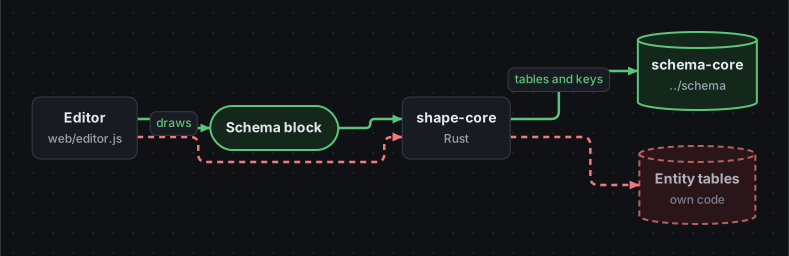
YouBring ../schema onto the board as a block
✦Added a Schema block on schema-core; it replaces the entity tables’ own code. 2 added, 1 removed.KeepDiscard
What you asked, and what the AI changed on the board: added in green, removed in red. Nothing changes until you keep it.Two people changed the same box: pick a side, or say what to keep.
Git is the database
A board is one text file. Your team already knows how to share it: commit, branch, open a pull request.
Edits rewrite only the lines that changed; your notes and formatting stay
See what a branch changed, in green, red and amber
Boards merge element by element, so most conflicts never happen
Every version is one click away; restore any of them (outside git too)
Link boards to each other: link: plans/q3.shape#launch
Plain text you can read
One statement per line. Write it by hand, draw it in the editor, or let an agent change it with a few small edits. A pull request shows exactly what changed.
Blocks are written as blocks: kanban, timeline, screen, gantt, adr, mindmap…
Comments and the presentation live in the file too
Models read short outlines and small edits, never coordinates, so AI calls stay cheap
# docs/roadmap.shape
kanban week: This week {
  column todo: To do {
    schema: Schema block [owner: deyan]
  }
  column doing: Doing {
    site: Landing page [blue]
  }
}

screen view: Open as [mobile] {
  title: Who is looking?
  radio: Full board | Product | Delivery
  button open: Open [blue]
}

timeline shape: Shape, so far {
  2026-10-07: First release
  2026-10-18: Renamed to Shape [important]
}

comment on schema by mia: Its own perspective?
# in your terminal$ shape ask docs/roadmap.shape "split Build into API and UI"
# comments → a task for your coding agent$ shape prompt docs/roadmap.shape --target code
# let an agent read a few lines, not the whole board$ shape query docs/roadmap.shape kind:kanban near:schema
Made for coding agents too
Install the bundled skills and Claude Code (or any agent) can read, draw and grow boards with few tokens.
One script tag puts a board in any page, read-only or with the full editor. It all runs in the browser; nothing is uploaded.
<script src="shape.embed.js"></script>

<div data-shape data-mode="view" style="height:420px">
  <script type="text/plain">
    you: You [person]
    you -> board: draws the plan
  </script>
</div>

// or the npm package (Node and browsers)
import { init, Board } from "@dobrinov/shape";
For Apple silicon and Intel Macs, signed and notarized by Apple. Open it and drag Shape to Applications; .shape files then open with a double-click. Shape → Install the shape Command… adds shape to Terminal. With Homebrew: brew install --cask dobrinov/tap/shape.
Homebrew
brew install dobrinov/tap/shape
Later: brew upgrade shape. For double-clicking .shape files, add the app (Shape.dmg) too: the two work together.
Without Homebrew
curl -fsSL https://dobrinov.github.io/shape/install.sh | sh
Paste it in Terminal. It puts shape in ~/.local/bin and Shape in your Applications. Run it again to upgrade.
Open PowerShell from the Start menu and paste it. It installs Shape for you (no admin rights), adds it to the Start menu and makes .shape files open with a double-click. Run it again to upgrade.
Or download it
Get shape-…-windows-x86_64.zip from the latest release, unpack it anywhere and run shape.exe install-app once from there.
One line x86_64 · arm64
curl -fsSL https://dobrinov.github.io/shape/install.sh | sh
It puts shape in ~/.local/bin and makes .shape files open with a double-click. Run it again to upgrade.
Homebrew
brew install dobrinov/tap/shape
Later: brew upgrade shape. Or get an archive from the latest release.
From source
git clone https://github.com/dobrinov/shape shape && cd shape
make install
Needs Rust with the wasm32-unknown-unknown target and wasm-pack.
Then open Shape: it opens a new board in its own window, and asks where to keep it once you have something on it.
Questions
Is it free?
Yes. Shape is open source under the MIT licence, with no paid tier.
Do I need an API key?
No. Shape uses the command-line tool of an AI subscription you already have (Claude Code, Codex or Gemini CLI), signed in as you. If you have none, the ✦ button explains how to set one up, and meanwhile shows the prompt to paste into any chat.
Where does my data go?
Nowhere new. A board is a file on your disk, the editor runs on your machine, and AI requests go through your own AI tool. The site's playground runs entirely in your browser.
How does my team work on the same board?
Through git: commit the file, branch, open a pull request. Shape shows what a branch changed, merges boards element by element, and signs comments with your name. Outside git, it keeps versions you can go back to.
Can I use it to write prompts for an LLM?
Yes, that is one of the best uses. Draw what you want built (the parts, the screens, the data, the rules), then copy the whole board or a selection as a prompt (⌘⇧C). It is plain Markdown, so it works with any model or coding agent, and the board stays the source you refine between attempts.
Does it replace Jira, Miro or PowerPoint?
For the thinking, planning and explaining part of a project, often yes: it is one board instead of several. It does not try to be a ticket tracker with workflows and permissions.
I used diagram before. Does anything break?
No. Shape was called diagram until October 2026. The diagram command still works as an alias, .diagram files open, merge and link like .shape ones, and with Homebrew, brew migrate diagram once moves you to the shape formula.
Changelog
What changed in each release. The full history is in CHANGELOG.md, and every release is on the Releases page.
v0.83.1
shape install-app keeps the Mac app. With Shape.app from Shape.dmg in Applications, shape install-app (from Homebrew, say) no longer replaces it with the older script copy: it lets the app open your boards. shape install-app --remove only removes that script copy; to remove the app, move it to the Bin.
v0.83.0
Shape for Mac as an app. Download Shape.dmg, open it and drag Shape to Applications. It runs on Apple silicon and Intel Macs and is signed and notarized by Apple. Double-clicking a .shape file opens it in Shape, each board in its own window, and opening Shape itself starts a new board. The app finds your AI's command-line tool the way your terminal does. Shape → Install the shape Command… adds shape to Terminal; a shape from Homebrew stays as it is.
Windows: installing the Claude skills works.shape skills install --global no longer stops with HOME not set: the skills go into your user folder.
Windows: ✦ AI actions run your AI's command-line tool, including one installed with npm (claude.cmd). Before, they looked for it in a way only macOS and Linux understand.
Older releases
v0.82.2
The macOS downloads are signed and notarized by Apple, so macOS opens them without the "unidentified developer" warning. Signing for Windows is on its way.
v0.82.1
The AI can reach every branch of a mindmap. Prompts now show each mindmap topic with its id (your file is unchanged), so ✦ Rethink and Ask can change or tag any branch reliably. For example, Rethink now tags a map's technical branches so the Product perspective leaves them out.
v0.82.0
Product shows the product, not how it is built. Product, Users, Design, Marketing, Business, Investors and Client leave out anything that is only technical (tagged tech): architecture sections, implementation decisions, a mindmap's technical branches, on the board and in their summaries. Something tagged both still shows. ✦ Rethink and Sort into perspectives tag technical things tech, and the next Rethink after this upgrade tags what is already on your board.
Sections and blocks take tags, like boxes: group arch: Architecture [tags: tech], adr embed: Use an iframe [proposed, tags: tech]. A section tagged for a perspective shows whole in it.
Every board has a Delivery perspective, product boards too. Without a plan, its summary says No delivery plan yet and offers ✦ Plan the delivery. The AI asks what it needs to know in a short form (the team, the start, fixed dates, milestones, platforms, outside dependencies). Answer what you can, and it drafts the plan: a gantt chart with stages and milestones, the delivery risks, and open questions for what you skipped. The traffic lights and burndown follow from it, and you see the plan before keeping it. Also in the ✦ menu.
Comments asking for another form are followed. A comment like these wireframes should be desktop now replaces the mobile screens instead of adding desktop ones next to them.
Wireframes for the right device. The AI draws screens for where the product runs (web for a web app or a widget in one), and asks when the board does not say.
v0.81.0
✦ Ask answers in the chat. A question about the board gets an answer in words, in the Ask panel, and each fact links to the block it comes from (a decision, a gantt task, a risk, a section or a comment). Click a link to go there; a comment's link opens its thread. It still draws, on a temporary canvas, when a picture says it better (things that depend on each other, a sequence over time, options side by side): the answer then has Open the drawing.
Links in answers find their element wherever it is, also when the AI writes them loosely (a chart's id as if it were a canvas).
v0.80.1
Windows: no more flashing terminal windows. Since 0.73, Shape on Windows starts without a console window, so every program it runs in the background (git, on each save and while it checks for changes, and your AI's CLI) opened a console window of its own. With Shape switching between those windows and the editor, it could not be used. They now run without a window.
Table text stays in its cells. On some systems text draws wider than Shape measures it, so a long first-column entry ran into the next column and the last column ran past the table's edge. Columns now leave room for that, and text wraps a little earlier.
v0.80.1
Windows: no more flashing terminal windows. Since 0.73, Shape on Windows starts without a console window, so every program it runs in the background (git, on each save and while it checks for changes, and your AI's CLI) opened a console window of its own. With Shape switching between those windows and the editor, it could not be used. They now run without a window.
Table text stays in its cells. On some systems text draws wider than Shape measures it, so a long first-column entry ran into the next column and the last column ran past the table's edge. Columns now leave room for that, and text wraps a little earlier.
v0.80.0
Platforms on gantt tasks.platform: ios (or web, android, or any word) marks which platform a task is for, with a chip by its name in that platform's colour, the same on every chart. Names stay short: Implement with an iOS chip and Implement with an Android chip, instead of Implement (iOS). Right-click a task → Platform…. Hovering a task says its platform too.
✦ Ask and ✦ Rethink set platforms instead of writing them into names, and give each platform's work a task of its own. The next Rethink after this upgrade moves platforms out of names already on your board.
A task with no length yet is drawn as a dashed outline saying no length yet, instead of a one-day bar forecast weeks late. Its hover says not estimated yet.
v0.79.0
Gantt bars and milestones say what they are on hover, on the board and on summaries: the name with whose it is (Web shop · Checkout · Beta), the day (Milestone · Wed 2 Dec 2026) or a bar's first and last day and length, the forecast when it is later (forecast Sun 1 Nov 2026 (+4d)), how it stands (late, behind, pushed back, done), how much is done, who does it and what it waits for. Exported SVGs carry the same text.
v0.78.0
A new board opens straight away. Opening Shape without a board (the app, or shape with no file) no longer asks where to save it first: you start drawing at once. Your work is kept as a draft from the first change, and the draft opens again if Shape is closed before it is saved.
Shape asks once there is something on it. After a few changes, a small bar offers Save… (ignore it to keep playing). ⌘S asks too, and so does closing the window: Save…, Discard or Cancel. Saving asks for the board's name and its folder (Change… opens the folder picker).
Always save new boards there? After your first save, Shape asks whether to keep that folder for new boards. If yes, later new boards only ask for a name. Choosing another folder asks again.
v0.77.0
A comment about several elements. With the comment tool (C), ⇧-click the elements a comment is about, then click one of them. Or select them and right-click → Comment on these…. The comment names them all (Comment on Database and Orders API), and opening its thread highlights each one. In the file it is comment on api, db: …. Delete one of them and the comment stays on the others.
✦ Rethink points out contradictions. When two things on the board cannot both be true (two dates for one launch, two owners for one task, a decision and a note that disagree), Rethink no longer picks one quietly. If the board settles it (a newer, dated update), Rethink applies it. If not, it leaves an open comment on all the items involved, asking which is right, and lists them in its note. Decide now, or reply later: the next Rethink acts on your answer.
The comments panel says the comment tool's shortcut is C (it said M).
v0.76.0
Groups in gantt charts. A task written indented under another is part of it: a sub-project with its own stages (spike, build, beta, general availability, or whatever your team calls them), or any work made of parts. The group's bar spans its parts and shows how much of them is done. Click the mark by its name to fold it into one row, with its milestones on it. Parts can share names across sub-projects (each sub-project can have its own Beta), and milestones say whose they are (Mobile app · Beta).
The roadmap unfolds. On a board of several projects, a project's row is folded. Click its mark to see its sub-projects, then click one to see its stages. Only milestones still ahead show on it.
Drag a bar's start. Dragging the left end of a bar changes when it starts and keeps its end; dragging a group moves all its parts. As before, drag a bar to move it, drag its right end to change when it ends, and draw an arrow from one bar to another to make it wait for that one.
Right-click a task → Add a part, Part of “…” (put it inside the task above), Out of “…”, Ungroup.
Better plans from the AI.✦ Ask and ✦ Rethink name tasks by what they deliver and whose they are (Mobile app beta, not Phase 2 beta), and group a project's sub-projects with the stages your team uses. What a stage waits for (an outside approval, a spike, another team) gets a task of its own. The next Rethink after this upgrade offers to restructure plans this way.
✦ Ask on a board of boards now sees inside its canvases, so a request about a project's plan changes that plan instead of starting a new one.
Removing a block (a gantt chart, table, risk matrix…) without saying otherwise removes its items too, instead of leaving them behind as loose boxes. A plain section still keeps its boxes.
A mistake in a block's first line no longer flags every item inside it as an error too.
shape ask and shape apply list what changed inside canvases too, instead of saying No changes. So does the session log.
v0.75.0
Each project has a summary of its own. On a board of several projects, a project's row on the roadmap (or its badge) opens that project's summary instead of its canvas: its plans, its burndown, its kanban boards and its risks, in whichever perspective you are in. The crumbs take you back up to the roadmap, and ← returns from the board to the summary you came from. Canvases inside a project, such as a task's risks or its test scenarios, are part of the project's summary.
The burndown is no longer on the summary of a board of several projects, where it showed whichever project's milestone came next. Each project's burndown is on its own summary.
v0.74.0
Rethink after an upgrade brings in what is new. A board records the version of Shape that last rethought it (rethought: 0.74.0, one line in the file, so it travels with git). After an upgrade, the next ✦ Rethink is told what the new version's built-in perspectives can show (test scenarios for QA, a canvas per project for Delivery…) and reshapes the board for them where it fits, from what is already on it. On opening such a board, Shape offers that Rethink once. Boards with only custom perspectives, or none, are left as they are.
Delivery on a board of several projects is one gantt chart: a row per project, with a bar for its whole plan coloured by how it stands and shaded for what is done, and its milestones (betas, launches) as diamonds on that row with their names. A project with no dates yet is a row without a bar. Each project's own plans, kanban boards and risks are no longer copied in. Its bar and badge open its canvas, where they are. A simple board still shows its own plan.
row: TASK puts a gantt milestone on another task's row (Beta on the Build bar) instead of a row of its own.
✦ Rethink fits a board's structure to its size: when a board has grown into several projects, it gives each project a canvas of its own. A simple board stays flat.
A QA perspective, in every set (project, product, startup, agency). It opens on how it works: the sequences, journeys and screens as they are on the board. Then come the test scenarios, failing ones first, the parts with no scenario yet, the decision records and the risks. The headline counts them (Tests: 14 scenarios · 9 pass · 2 fail · 3 to run · Not covered yet: Refund).
✦ Draft test scenarios (the ✦ button, or right-click the board): the AI reads how the canvas works (its flows, screens, data, decisions and risks) and writes what a tester should run, each with steps, the expected result and the part it covers. The main paths come first, then edge cases, errors and permissions. They go in a table on a canvas of test scenarios, and running it again adds new ones only. You see them before keeping them.
Any table with an expected column is a table of test scenarios. Right-click a scenario → Passed, Failed, Blocked or To run sets its status and tints the row.
v0.73.0
Install in one line on every system. The website shows the install for the system you're on, with the others a tab away. On Windows, paste irm https://dobrinov.github.io/shape/install.ps1 | iex into PowerShell: it installs Shape for you (no admin rights), puts it on your PATH and in the Start menu, and makes .shape files open with a double-click. On macOS and Linux, curl -fsSL https://dobrinov.github.io/shape/install.sh | sh does the same without Homebrew. Run either again to upgrade, and the New badge says which one to run.
shape.exe has Shape's icon in Explorer, the taskbar and the Start menu, and opened from there it no longer leaves a console window behind its own.
shape install-app on Windows adds Shape to the Start menu too (--remove takes it out).
The Windows download holds a single shape.exe. The old diagram name is now a tiny diagram.cmd next to it, instead of a second copy of the program.
v0.72.0
Session logs. Every Shape session keeps a log on your machine: the board it opened, each AI request (what you asked, the prompt, the reply, the model, how long it took, or why it failed), whether you kept or discarded the changes, every save and what it changed, and the editor's errors. shape logs shows the latest session; shape logs ai and shape logs errors show just those, --list the sessions, --session N one of them, --full everything, and --clear deletes them. So when something goes wrong, an agent helping you can see what happened.
--debug logs the details too: every change you make, each perspective and canvas opened, the editor's warnings.
Logs stay on your machine (~/Library/Logs/Shape on macOS) and hold board content; the last 30 sessions are kept. SHAPE_NO_LOG=1 turns them off, SHAPE_LOG_DIR puts them elsewhere.
v0.71.0
A board of boards. Bring whole boards into one, each as a canvas with a button that opens it: right-click the empty board → Bring in a board…, or shape import FILE BOARD…. A board without perspectives of its own takes its canvases' set, so its summaries work straight away.
A roadmap across them. When a board is made of several pieces of work, Delivery, Product, Business, Investors, Client and Marketing show a Roadmap: a bar per canvas for what is left of it, coloured by its worst light, and its milestones with their lights (Beta → Nov 2 when forecast later). Canvases without dates are listed below it, and a bar opens that canvas's plan.
Delivery shows the whole plan when there is more than one thing to ship: every gantt chart, as it is, named after whose it is.
A gantt task can open a canvas of its own for its risks, blockers and the rest of delivering it: right-click it → Give it a canvas, or canvas: id on the task. A badge by its name says how many risks it holds, in the worst one's colour, and opens it. On the Roadmap, each canvas's bar has the same badge.
Each milestone says whose it is (Now delivering: Web shop · Beta), and Product shows each canvas's map in its own section.
Summaries leave out empty risk matrices.
Fixed: adding or changing a perspective rewrote the whole file, dropping its # notes and its own layout. Now only that line changes, and changing the set of a board written with type: rewrites that line too.
v0.70.0
Marketing, Design, Legal and Users open on their own summaries, like Delivery, Business, Product and Technical:
Marketing: the next launch and its light, the readiness checklists with their progress, the dates people outside see (starred first), and Don't promise yet: launches at risk, decisions not taken and high risks, each with why.
Design: the screens as they are on the board, with the flow between them, how many flows and open design comments, the comments on screens and the design decisions.
Legal: what is waiting (decisions, high risks, overdue obligations), the obligations with their due dates (overdue in red), the risk matrix and the decision records.
Users: the journey as the swimlanes draw it (or the screens in order), what users told us, and the open questions.
In every summary, a block too wide for a column (the screens, a gantt chart) takes the whole width, and a table of comments no longer shows a pin on each of its rows.
v0.69.1
While the AI works on the board, its card stays still: no light sweeping over the board, no turning icon.
What the AI changed comes in the same kind of card: what it did, how many changes are highlighted on the board, then Copy summary, Discard and Keep.
Fixed: a long request (a link, say) ran out of the card while Add what you know worked. The card says Adding what you know and shows the request below, wrapped, at most two lines.
v0.69.0
Copy as text, next to Copy as prompt when you right-click a block, a topic or a selection: what the board shows, to paste for people, in Markdown, without the details behind the items, their ids or the notes meant for a model. A to-do list comes out as a checklist (sub-items indented, owners and due dates in brackets), a mindmap as indented bullets, a table as a table. Copy as prompt still gives the AI everything.
v0.68.0
Check for Updates… (macOS, under Shape → About Shape): asks GitHub now, whatever Shape remembered, and says what it found: Shape 0.69.0 is out, with how to upgrade (brew upgrade shape) and See what's new for the release notes; or that you have the latest version; or why it could not check. The New: … badge in the editor follows. In a terminal: shape version --check.
v0.67.0
The board says when the AI is at work on it. While Rethink or Add what you know runs, the board dims and is locked: no clicks, keys or edits, and the top bar and tools wait too. A light sweeps across it, and a card says what is going on (Reading the board, every canvas and comment… → Working out what changed… → Choosing the right block for each thing… → Writing the changes…), how long it has taken, and when a reply did not fit and it asks again. Stop waiting frees the board at once and throws the late answer away. When it is done, you see the changes to keep or discard, as before. With reduced motion on, nothing moves.
v0.66.0
Named sets of perspectives. A board's audiences are a set, picked under Board → Perspectives (it was Type), which lists what each brings: Project team (Delivery, Product, Technical, Legal, Business, Marketing, Design), Product team (Product, Technical, Users and the same four), and two new ones: Startup (Investors, Product, Delivery, Technical, Business, Marketing, Design) and Agency, for client work (Client, Delivery, Business, Design, Technical). Investors opens on the money, the launches and the risks; Client on what they get and when, and what we need from them.
In the file it is one line, perspectives: project (startup, agency, product, none). type: project, as it was written before, still works.
A board with plans on it (a dozen elements, two kinds of planning block) and no set asks once, when it opens, which set fits.
Rethink picks the right block for each kind of information: dates on a timeline, work with owners on a to-do list or kanban, a plan on a gantt chart, risks on the matrix, a choice in a decision record, numbers on a chart, revenue in a forecast, screens as wireframes. Loose boxes and stickies that are really one of these move into it. Add what you know puts new information in the right block the same way.
v0.65.0
Images for the AI. In Add what you know (⌘K) and in Ask, paste a screenshot (⌘V), drop images or pick them with the 📎 button: they show as thumbnails (× takes one off) and go to the AI with what you write, so it can read a slide, a chart or a whiteboard photo and put what it says on the board. Images stay out of the board, so the file stays small, unless you tick keep on one in Add what you know: that one is added as an image box too.
Your AI tool gets them as files: Claude Code reads them, Codex attaches them (-i), Gemini includes them (@FILE); another command finds their paths in SHAPE_AI_IMAGES. They are deleted once it has answered.
Without a connected AI, the prompt to copy says to attach the images in your chat too.
v0.64.0
Claude skills follow upgrades. Skills installed with shape skills install (in ~/.claude/skills or a repository's .claude/skills) are brought up to date the first time a newer Shape runs, which says which it updated. A skill you edited is left as it is. SHAPE_NO_SKILL_REFRESH=1 turns it off.
The skills know the blocks added since they were written: to-do lists, wireframe screens, database schemas, forecasts, perspectives and the rest, each with its one-line form.
v0.63.1
Comment from a perspective's summary. The comment tool (C) works there again: click a milestone, a risk, a topic or any row to comment on what it stands for. The comment is kept on that element on the board, in whichever canvas it is. The comments on what a summary shows appear on it, and clicking one opens its thread on the full board, to reply or resolve.
v0.63.0
Revenue forecasts:forecast revenue: Revenue [unit: £] { now: 12k · Phase 1 GA [adds: 3k, ramp: 3] … }. Revenue now, and what each launch adds a month once it has ramped up. A launch is a gantt milestone by its name, so its date comes from the plan (or on: DATE). Drawn month by month, as planned and as forecast: when the plan slips, the curve moves. Blocks → Revenue forecast starts one with the board's milestones; right-click → Edit as text….
Business leads with the money:Revenue: £12k a month now → £23k by Jun 2027 · the slips cost £4k by then, the forecast's chart, then the launches with their lights, decisions needed and top risks.
Product shows what is being built, whole: the board's title and description, the product's mindmap (two levels open, deeper ones folded) and How we deliver it: each plan, kanban board and milestone with its light, one click away.
Technical is about the architecture decisions: how many are recorded, every decision record with its status, and the decisions talked about but not written down as a record yet.
Charts put a space before a word unit (250 boards, not 250boards).
v0.62.1
Fixed: the editor could miss new versions for a day. It kept GitHub's answer for 24 hours (even one older than itself) and asked only when it started. Now it asks when it starts and every hour while it runs, keeps the answer for an hour, never believes one older than itself, and the New: … badge appears in an editor left open too.
v0.62.0
Delivery shows what is being delivered now. Its summary leads with the next milestone and its traffic light (Now delivering: v1.0 · At risk · due Nov 13, in 25 days and why), then the board's own blocks:
a burndown of the work left before it: as planned, and from today as forecast (or the board's own burndown chart, when it has one);
the kanban boards, with their cards per column, one click away;
the gantt chart the delivery is on, when it depends on more than one piece of work;
the risk matrices, as they are.
Click a bar, a risk or a board to open the real one on the full board; ← Delivery comes back.
v0.61.0
Perspectives open on a summary. Instead of the board's blocks folded into cards, each perspective opens on a first screen Shape works out from the whole board (the boards inside it too), so it never needs keeping up to date:
a headline that answers the role's first question: Off track: v1.0 in 20 days, and why;
milestones with a traffic light and the reason: off track when the work planned to end by it is forecast to end after it (or is late), at risk when it is behind or open blockers, high risks or overdue to-dos weigh on the next milestone, on track otherwise;
open blockers (a blockers kanban, a section about blockers, anything tagged blocker), decisions needed (proposed decision records, a section of asks), top risks, and what changed since a week ago;
by role: Delivery is about the plan, Business adds the board's revenue charts (or says there are none yet), Marketing the checklists, Product and Design the screens, Technical and Legal the decision records.
Click a row to open what it stands for on the full board, in whichever board inside it it is; ← Delivery goes back. Details shows the blocks behind a summary. A summary is read-only.
shape svg|png FILE --perspective delivery exports a perspective's summary (--as-of DATE, --base REF for what changed).
The landing page shows the summaries of Shape's own board, as Delivery, Product and Marketing see it. The example board is now a project board, with a blocker and an open decision.
Fixed: a table's bold first column could run into the next one, and a word that just fit could break in two.
v0.60.3
About Shape (macOS, Shape → About Shape): Shape's icon, its version, what it is in a sentence, and a link to the website. Before, it showed a folder icon and nothing else.
The menu bar says Shape, not shape.
v0.60.2
Fixed: scrolling (a mouse wheel or a two-finger swipe) over an open popup, such as the Blocks menu, the Ask panel or the AI menu, moved the board behind it. It now scrolls the popup, and the board stays put; over the bars and the minimap the board stays put too.
v0.60.1
Fixed: in a small editor (like the one on the landing page), the Blocks menu ran up under the top bar. Popups now stay inside the editor and scroll instead: the Blocks and AI menus and the Ask panel stop below the top bar, the Board, History and right-click menus stop at the bottom edge, and they fit again when the window is resized.
v0.60.0
Database schemas:schema db: Database [file: db/structure.sql] { … } puts the tables of a real schema file on the board: a Postgres structure.sql, a MySQL or SQLite dump, or a Rails schema.rb, read by the parser of schema. Columns keep their types, primary keys, unique columns, nullability, defaults and foreign keys (drawn with crow's feet).
The tables are ordinary tables on the board: point arrows and comments at them, see them in perspectives and prompts, and review a branch's schema change in the board's diff.
The file stays the source. shape schema BOARD db/structure.sql adds a schema (or updates the one from that file; --only 'users orders*' keeps some tables); shape schema BOARD updates every schema from its file, in canvases too. Updating changes only what changed, and keeps what you added on the board, like a relationship's name.
In the editor: Blocks → Database schema lists the schema files in the project (or takes a pasted one). When the file has changed, opening the board offers Update. Right-click a schema → Update from FILE, Paste a new version…, Tables to show….
The example board's Data & flows canvas reads Shape's model from examples/model.sql.
Fixed: the resize grip (0.59.0) sat on a box's link or canvas badge and stopped clicks on it; it now sits just outside the corner.
v0.59.0
From a beta tester's notes:
Resize from the corner: a selected box has a grip in its bottom-right corner; drag it to make the box bigger or smaller.
Click a dot to add a box: a click (not a drag) on one of a box's four dots puts a new box on that side, joined to it, ready to name.
Connectors start where you grab them: while dragging a new connector, its line starts at the dot you dragged from, not the box's centre.
Smooth dragging: boxes, images and sections follow the pointer smoothly; the board lays itself out when you pause or let go.
Z for the magnifier: click to zoom in, ⌥-click to zoom out, drag a box to zoom to it; Z or Esc leaves it.
The native window shows Shape's icon and name in the Dock instead of a generic "exec".
v0.58.0
To-do lists:todo launch: Launch checklist { … }, one item per line, [x] done and [ ] to do (Markdown-style - [ ] works too). Two more spaces make a sub-item. An item can have an owner, a due date (due:) and details.
The list shows how many are done and a progress bar; done items are struck through; one past its due date and not done is red.
In the editor: Blocks → To-do list. Click an item's box to tick it. With an item selected, Enter adds the next one and Tab / ⇧Tab change its level. Right-click for owner, due date, details and Edit as text.
Prompts show a list as a Markdown checklist; the AI can tick, add and indent items. The Release checklist recipe is now a to-do list, Delivery shows to-do lists, and folded cards say 2 of 5 done. The example board's delivery plan has one.
v0.57.0
A new logo: an S folded like a ribbon, blue, teal and green, on a dark tile, with a lowercase shape wordmark. It is the app's icon, the window's, the favicon, the document icon and the share image, and the wordmark heads the website and the editor. Run shape install-app again to see it in Finder and the Dock.
Fixed: Expand all showed on the full board, where there is nothing folded.
v0.56.0
Arrows go round boxes: an elbow arrow whose usual path would cross a box takes the shortest way round the boxes instead, with as few bends as it can, keeping clear of them. Arrows with nothing in their way keep their shape. On a board with two phases side by side, the arrow to the second no longer runs through the first. Curved and straight arrows are unchanged.
v0.55.1
Fixed: when the AI tool ended before reading the whole prompt (not installed, not signed in), the error said "broken pipe" instead of what happened. This also made a test fail now and then on Linux, which held back the website's deploys.
v0.55.0
A new icon: a white square, a yellow circle and a green triangle on an indigo-to-blue tile, for Shape.app, the window, the favicon, the website and the .shape / .diagram document icon (which now reads SHAPE). Run shape install-app again to get it in Finder and the Dock.
A new share image: links to the site show the icon, the name and From a messy idea to a plan everyone gets.
v0.54.0
Perspectives start high level and drill down: a perspective opens with its sections and blocks folded into cards. Each card shows the title, what is inside (2 risks, 1 high, 3 to do, 1 doing, 4 events…) and its first few items. Arrows run between the cards. Click a card to open it in place; Expand all in the top bar opens everything, Fold all folds it back. Each role keeps open what it looks at first: charts for Business, the timeline for Delivery, Product and Marketing.
Built-in perspectives, rethought:
Senior management is gone: every perspective now starts at that level.
Finance and Commercial are one, Business (money, pricing, deals and the numbers). Boards tagged finance or commercial still show there.
Team is Delivery: who does what by when, and what could stop it. team tags still count.
User is Users, and the perspectives pick blocks for their role. Product and Design include wireframe screens; Technical includes cycles.
The picker says in a line what each one is for.
An empty perspective explains itself: when nothing on the board is tagged for it yet, it says so and offers ✦ Sort the board into perspectives or the full board.
v0.53.2
Perspectives: the whole board is Full board (it was Everyone), in the top bar and in the picker when a board opens. The picker describes each perspective in a few words (Decisions, risks, timelines and more) and its text wraps instead of being cut off.
v0.53.1
Wireframes in dark mode: a phone's or tablet's body is a dark grey there, not white. The landing page's flow picture is drawn dark like the rest of the page.
The website's analytics use the new site key.
v0.53.0
diagram is now Shape, all the way through.
The command is shape (shape plan.shape, shape ask …, shape install-app). diagram stays as an alias: the release archives and Homebrew install it next to shape.
New boards are .shape files. .diagram files still open, save, link (plans/q3.diagram#launch), merge and show in history, and install-app registers both extensions.
The repository and the site move to github.com/dobrinov/shape and dobrinov.github.io/shape.
Environment variables are SHAPE_AI, SHAPE_WEB_DIR, SHAPE_NO_UPDATE_CHECK and SHAPE_SKIP_WASM. The DIAGRAM_* names still work.
The language is the Shape language and prompts use ````shape `` blocks. A reply with a ```diagram ``` block still applies.
The agent skills are shape-draw, shape-review, shape-edit, shape-mindmap and shape-embed; installing them removes the old diagram-* ones.
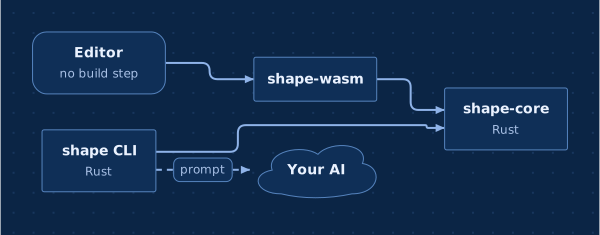
The browser library is Shape (Shape.mount, Shape.render, <div data-shape>); Diagram and data-diagram still work. The npm package is @dobrinov/shape; the crates are shape, shape-core and shape-wasm.
shape merge --install registers a shape merge driver for both extensions.
Fixed: shape apply with a reply holding a whole board in a fenced block read past the fence's name.
v0.52.0
Wireframes are easier to use:
The Blocks palette has a Wireframes group: Phone, Web page, Tablet and Screen flow (three linked screens to start from).
Select a screen or a component and a bar offers the common components (title, text, button, input, list, image, tabs, card) and All ▾ with the full list. A new one goes after the selected component and you type its text straight away.
↑ ↓ or ⌥↑ ⌥↓ move a component; Edit as text is on the bar too.
Renaming a component keeps its screen's prefix (login.submit); before, a new component named by its text could lose it.
The landing page has a Wireframes and flows section with a sign-up flow across phone and web.
The landing page's AI picture now shows the whole exchange: what you asked, the change on the board (added in green, removed in red) and the Keep / Discard bar.
Boards as prompts: ⌘⇧C with nothing selected copies the whole board, every canvas in it, as a Markdown spec to build from: what to do, each board's sections and blocks, the connections and the open comments as questions to ask. It is also on the empty board's right-click and under Share (Copy as a prompt to build it), and in the terminal as diagram prompt FILE --target build. Screens list their components by kind. The landing page and the README now say Shape is a way to write prompts too.
diagram is now Shape. Everything you read says Shape: the editor, the window title, the app (Shape.app; diagram install-app replaces Diagram.app), the file type, the help text, the README and the website. The diagram command, .diagram files, the Homebrew formula and the repository keep their names, so nothing breaks.
A new landing page: what Shape is for (from a messy idea to a plan everyone gets), why teams switch, how it works in three steps, one board for every audience, the blocks (now with wireframes, timelines and cycles), the AI, git, install and a short FAQ. It works on phones without scrolling sideways. The example page shows the checkout screens.
The minimap stays out of small editors (narrower than 900px), such as boards embedded in a page.
v0.51.0
Wireframes:screen login: Sign in [mobile] { … } draws a screen as a phone, a tablet or a browser window (web), its components one per line, top to bottom: kind [id]: text [attrs].
Items go in the text, separated by | (tabs: Home | Search | Me). A tab bar and a floating button sit at the bottom; a sidebar takes the left of a wide screen.
Flows: every component is a node with its own id (login.submit), so an arrow from a button to another screen draws the flow. In the editor, drag from a component to a screen; dropped on empty canvas, it makes the next screen of the same device, beside the first.
In the editor:Blocks → Phone screen and Web page. Right-click a screen to edit it as text (components keep their ids and arrows), add a component, or change the device. Right-click a component to add one after it, edit its details or colour, or lead it to another screen.
For the AI: the op reference describes screens (add_group with screen, add_node with widget, or merge the block), and a new Screens and flow recipe. The Product, User and Design perspectives show screens. The example board has a canvas of checkout screens.
Fixed: clicking or dropping an arrow inside a plotted block (a chart, a table, a screen…) now finds the block.
v0.50.0
Boards open in their own window:diagram FILE (and double-clicking a .diagram file) opens the editor in a native app window instead of a browser tab: the system webview (WebKit on macOS, WebView2 on Windows). Closing the window saves what is pending and stops. On macOS it has an app menu, so ⌘C / ⌘V / ⌘Z / ⌘Q work. Links out of the editor open in your browser. --browser opens a tab as before; --no-open runs only the server. Where no window can be made, the browser opens.
A new board asks where to go:diagram with no file (or opening Diagram.app on its own) shows a save dialog to name the board and pick its folder; Cancel creates nothing.
The Linux release binaries are built without the window (--no-default-features), so they still run without WebKitGTK and open the browser; build from source for the window there.
v0.49.0
Presentation mode: the Present button opens it. The board's slides are on the right, in order, each a section, block, mindmap, box, a canvas (from the box that opens it) or the whole board. Their order is drawn on the board: a numbered badge and frame per slide, arrows from each to the next.
Per slide: a title (else its target's), speaker notes, its own transition, ↑ ↓ to reorder, a comment on what it shows, ×.
For the presentation: a title, the transition, and instructions (who it is for, how long, what they should leave with).
Start with the board's sections makes a deck in one click (the whole board first, then each section and block). ✦ Draft slides with the AI writes the order, titles and notes from the board and the instructions; you see the changes before keeping them.
▶ Present plays it full screen: → next, ← back, N speaker notes, Esc stop. Transitions: glide (the default: the view moves across the board to the next slide), fade, zoom out and back in, or cut. A board without slides plays its sections as before.
In the file:presentation: Title [transition: …, instructions: …] { … }, one slide per line (risks [title: …, notes: …, transition: zoom], * for the whole board), written back without touching the rest of the file. Op presentation; the AI's op reference has it. The example board has one.
v0.48.0
Minimap: the whole board small in the bottom-left corner, sections and boxes, with the part in view marked. Click or drag in it to move around. It takes the board's shape; M (or the button in the zoom bar) hides or shows it, and the choice is remembered. It is hidden while presenting and on narrow screens.
v0.47.0
Rethink fills the perspectives: on a product or project board (or one with perspectives of its own), Rethink now gets the perspectives and how many elements each shows, and tags every element for the audiences it matters to, so none stays empty. Before, perspectives showed only what someone had tagged by hand.
Changing the board's type warns you: it names the perspectives the new type brings and offers Change and rethink (the AI sorts the board for them; you see the changes before keeping them), Only change the type, or Cancel. Back to a sketch changes it directly.
Opening a board asks how to view it: a board with perspectives opens with a choice of Everyone or one of them; the one picked last time is marked. Switch any time from the top bar.
WASM builtin_perspectives(kind).
v0.46.1
Arrow labels no longer cover each other: a label that would sit on another label, or on a box, moves along its arrow (or just beside it) to a free spot.
Parallel arrows keep apart: the long runs of elbow arrows that would pass within 24px of each other are spread out.
v0.46.0
Connect your AI: with no AI connected, the ✦ menu starts with Connect your AI. It lists Claude Code, Codex CLI and Gemini CLI: which subscription each uses, how to install it, how to sign in, a link to its docs, and which are already installed. It also says how to pick one (--ai) or use any other command. The copy-the-prompt dialog links to it too.
When the AI fails: the editor shows what the tool said and what to try:
not found: install it or give its full path;
not signed in: the command that signs in;
a limit reached or the service busy: wait, or use another one;
no connection: check the network.
Check it works sends a one-word prompt to test it. With an AI connected, the ✦ menu's Your AI: check it, or change it… opens the same dialog.
The subscription CLIs are also looked for where their installers put them (~/.local/bin, ~/.claude/local, Homebrew, npm and bun folders), so an editor opened from Finder or a desktop launcher finds them.
Server: GET /api/ai lists the installed CLIs; POST /api/ai/check; failed calls come with a hint.
v0.45.0
AI prompts… in the Board popover: the prompts that Rethink, Sort into perspectives, Ask and Add what you know would send for this board as it is now, one tab each, to read or copy (and give feedback on). Nothing is sent from there.
v0.44.1
Prompts to the AI start with today's date (the editor's and diagram ask / diagram expand's), so a model no longer guesses the year when it writes dates.
v0.44.0
History: the clock button in the top bar lists the board's versions, with who made each and when (hover a version for its exact time).
In git they are the commits that changed the file.
A board git does not track gets snapshots kept beside it in .diagram-history/<file>/: one at most every five minutes of saving, signed by whoever saved, the newest 200 kept.
Changes highlights what changed since a version. Restore brings one back; ⌘Z undoes it.
Your name first: when git does not know your name, the editor asks for it before you edit or comment. It signs your comments and the snapshots, and this browser remembers it.
Server GET /api/history and GET /api/history/version?id=; PUT /api/file takes the author in X-Diagram-Author.
Fixed two prompt tests left behind by recipes.
v0.43.0
Recipes: ready-made arrangements of ordinary blocks for what a software team keeps coming back to. There are 17:
Achievements; Mistakes and lessons; Incidents (log, timeline, post-mortems);
a traffic-light Status report; Burndown; OKRs; Roadmap; Retrospective;
RACI; Prioritisation (effort against impact); Personas; User journey;
Tech debt register; Release checklist; Stakeholder map; Team ownership; Metrics.
The AI knows them:Add what you know, Rethink and Ask get a line on each (when to use it, its shape), so the model builds in that shape when the content fits, or adds to the one already on the board. Told "payments were down for 2 hours on Monday…", it adds an incident with a post-mortem.
Insert recipe… on the empty board's right-click menu places one; its rows are examples to write over. Recipes are not in the Blocks palette.
Your team's own:.diagram files in a recipes/ folder, from the board's folder up to the repository's root, first line # recipe: Name — when to use it. The editor and diagram ask read them.
Core recipes module; prompts take recipes; WASM recipes, set_recipes; server GET /api/recipes.
v0.42.0
Cycle diagrams:cycle loop: Build loop { Plan · Build · Measure · Learn }, one step per line. The steps go round a circle with an arrow from each to the next and from the last back to the first; the circle grows with the steps so they never overlap. Steps take colours, details, links and comments. In the editor: Blocks → Cycle; right-click to add a step after one or edit the cycle as text. Perspectives can show cycles (show: cycle).
v0.41.0
Perspectives: one board, seen by different audiences. A perspective shows the elements tagged for it and the blocks it cares about (with the sections, arrows and comments around them), and can hide details. It changes only what you see.
Board types bring built-in ones.type: product brings Product, Technical, User and Senior management. type: project brings Senior management, Team, Product and Technical. Both also bring Legal, Finance, Marketing, Commercial and Design. A sketch (the default) has none.
Add your own (New perspective…: a name, a tag, which blocks, details on or off), written as perspective legal: Legal [tags: legal, show: adr]. One with a built-in's id overrides it.
In the editor: pick one in the top bar; the pick is kept per board. New elements get its tag, so they stay in view. ✦ Sort into perspectives has the AI tag the board.
Templates for types:diagram new FILE --template product and --template project start boards with a type, starter content and perspective tags. The Board popover changes a board's type.
The breadcrumb is back above the canvas: it was hard to see in the top bar. It shows when you are inside a canvas or an answer.
Core perspectives module, BoardKind, Session::apply_top (ops for the whole board while a canvas is open); op perspective; set key type; render option perspective. WASM perspectives, board_type, apply_top.
v0.40.2
Rethink just runs: one click, no dialog. It acts on the open comments and brings the board up to date with its default instructions. The editable instructions and the examples are gone; perspectives (next) cover showing the board to other audiences.
v0.40.1
New icons: the timeline is a winding path with milestones on it, solid at the start and the end; the mindmap is a head with a small map of branches inside.
v0.40.0
Ask draws its answer. A question about the board ("what blocks the launch?") is answered on a temporary canvas made for it.
The AI reads the whole board and draws a small diagram: boxes and arrows, sections, a timeline, a table or a mindmap, with open questions as stickies. A one- or two-line summary sits on top.
Every piece links back to its place on the board; a link goes there, into its canvas.
The answer is not saved: autosave, ⌘S and undo leave the file alone.
Its bar offers Follow-up… (the answer is drawn again), Rethink the board from this (your question, the answer and any comments you left on it become Rethink's instructions), Save as canvas (kept as a canvas with a link box on the board), and close (Esc).
Links to a place anywhere on the board: #/id on the top board, #/plan/id inside canvas plan.
One bar instead of two. The app's name, then where you are as a breadcrumb (the board, then each canvas you went into), replacing the floating trail. Then a git chip, the save status, and on the right undo, redo, Board, Present, light/dark and Share (the old Export ▾).
The git chip says which branch this is and how much changed: research · 4 changes since main, or on main the changes not committed yet. It counts every canvas and updates as you edit. Clicking it shows those changes on the board; clicking again stops.
Board holds what were three selects in the bar: flow direction, arrow style, theme (and Edit theme…), and Tidy up the layout.
The tool bar at the bottom is short: select and hand, then box, sticky and connect, then Blocks, then comment. Blocks opens one palette with every block, each with a line on what it is:
Specify: sequence diagram, database table, swimlanes, decision point, section, canvas. Keyboard shortcuts stay (T, N, D, S, X, C, ⌘G).
Zoom moves to the bottom-left; the AI button keeps the bottom-right.
Core change_count; WASM count_changes; /api/since also gives branch and main.
v0.38.1
The AI button's icon is a spark: one four-point star and a small one, in white on the blue button (no longer yellow glitter).
v0.38.0
Rethink with your own instructions: Rethink opens a dialog with what it will do, in words you can change. The default is a better prompt: 1. act on every open comment, wherever it matters, and resolve it; 2. take in what is new and revise the older items around it; 3. put related items in named sections, merge duplicates, and fold stray notes in; 4. give items short titles, with the context in their details; 5. fix arrows; 6. never drop information. Start from For senior management (lead with the decision, status and risks; move technical detail into details shown on hover), Shorter, clearer titles, or write your own. The last instructions you used are remembered in this browser. Only how to write the changes (ops, ids, canvases) stays fixed. Core prompt::RETHINK_DEFAULT and an instructions argument for rethink / Session::rethink_prompt; WASM rethink_default; npm rethinkPrompt({instructions}).
Dialogs show their main button in the accent colour (Add, Rethink, Save).
v0.37.0
Timelines: a new block for what happened when. One event per line, DATE: what happened [important], with the date as you write it: 2026-10-28, 28 Oct 2026, Oct 2026, mid Dec 2026, Q4 2026, 2026, ~6 Aug 2026, or a span (7–14 May 2026). Events sit on a line by date:
busy weeks spread out and quiet years shrink;
labels go above and below, out of each other's way, and their connectors do not cross other labels;
a span is a bar; an important event is a star, nearest the line, in bold;
ticks carry the year where it changes. In the editor: the Timeline tool; right-click → Add event…, Edit as text…, and on an event Change date…, Mark important, details, colour. Show as timeline turns a date | event table into a timeline, keeping ids, comments and links (⌘Z turns it back). A date that cannot be read is refused with what dates look like. Ask, Rethink and prompts read events in time order. Core timeline module; timeline on groups, date and important on nodes (DSL, JSON, ops, typings).
More context on boxes: hovering a box shows a card with its whole title, its detail, and what else is known (owner, dates, tags, link, open comments). Kanban cards stay compact: their detail moves to the hover card, and a small ≡ marks the cards that have one. Right-click a box → Add details… / Edit details… writes them. Before, details could only be edited in the hidden inspector.
The tool bar at the bottom no longer runs under the code pane when the board is narrow: it scrolls instead.
v0.36.0
Rethink acts on your comments, across the whole board. Before, Rethink saw only the open canvas and treated comments as discussion to tidy up, so a comment like "we are shipping two card products now" changed nothing. Now:
it reads the whole board, every canvas included, wherever you start it;
open comments come first, listed with where they are. The AI changes the board everywhere a comment affects it, then resolves the comment with a resolution saying what changed (or replies when it cannot act);
in git, what changed on the branch is shown per canvas.
Fix:Add what you know and Rethink applied the AI's reply to the top board even when you were inside a canvas, so a reply about that canvas failed ("no node …") and ended in an error. Replies now apply where they belong.
When the AI changes nothing, its note stays on screen (with OK) instead of a toast that disappears.
New op {"op":"in","canvas":"plan/details","ops":[…]}: change things inside a canvas from the board around it. A single op that carries ops is no longer mistaken for a batch.
New versions: the editor's check and the Homebrew tap take the highest released version, not GitHub's "latest". That label goes to the release created last, which was v0.34.1 rather than v0.35.0 when both were built at once. The release workflow now marks only the highest tag as latest.
v0.35.0
✦ Ask: a third choice in the AI button: ask a question about the board, such as what blocks the launch, who owns what, or what is still open. The model reads the whole board, every canvas included, with gantt forecasts as of today. It answers in a few sentences, and every place it mentions is a link: click it and the board goes there and selects it, opening the canvas it is in. Follow-ups continue the conversation until you close the panel (Esc). Nothing is saved, and nothing on the board changes. Without an AI CLI, the prompt is shown to copy, as for the other AI actions.
The AI button's icon is sparkles (one large, three small, in the logo's yellow) instead of a wand.
v0.34.0
Your own file icons:diagram install-app (once; --remove undoes it) gives .diagram files a document icon (the logo on a page) and makes a double-click open the board in the editor.
macOS: a small Diagram.app that declares the .diagram type (io.github.dobrinov.diagram.board, plain text underneath, so Quick Look still shows it). It goes in ~/Applications, or in ~/Library/Application Support/diagram when that folder is not yours. It keeps your PATH, so ✦ AI finds your CLI.
Linux: a MIME type application/x-diagram, its icon and a .desktop entry under ~/.local/share.
Windows: a file association and icon for your user.
--idle-exit: an editor server started from a double-click stops once no editor tab has been heard from for 3 minutes. Tabs check in every 30 seconds, also in the background.
New versions: once a day (cached), the editor asks GitHub for the latest release. When there is a newer one, the terminal says so with how to upgrade (brew upgrade diagram for a Homebrew install), and a New: x.y.z badge in the top bar links to its notes. A failed check is silent. DIAGRAM_NO_UPDATE_CHECK=1 turns it off; it is off under CI too. Server GET /api/update.
v0.33.0
Comments look like comments: a comment is now a speech bubble on the corner of what it is about, with its author's initials (lines of text when there is no author) and a small count of replies. The number is gone from the board, the thread and the comment list; it was only the comment's place in the file. Hovering a bubble shows who wrote it, how it starts and how many replies it has. Clicking it opens the thread, headed "Comment on …".
Comment mode does not follow links: with the comment tool (or any tool that puts something on the board), clicking a box's link or canvas badge comments on the box. A box with a web link no longer opens a browser tab when clicked; links open from their badge, in select mode.
Pin (render output) has author and replies.
v0.32.0
The AI button: the AI now lives in a round button in the bottom-right corner of the board, with a magic-wand icon; hovering it says what is there. It opens two choices:
Rethink: organise what has been collected on this canvas (as in 0.31.0; its tooltip says what it does).
Add what you know (⌘K), which replaces Ask AI: write down details or information you have (interview findings, numbers, who said what), about the selection or the whole canvas. The AI puts each where it belongs, into the item it is about or as a new box or sticky next to it. You can still ask for a change.
The Ask AI and Rethink buttons leave the top toolbar. The zoom controls sit above the AI button. Where the board is narrow (a phone, an embedded board), both rise above the tool bar.
The ask prompt tells the model that a request may be information to place, not only a change to make.
v0.31.0
✦ Rethink: one click (the toolbar, or right-click on the empty board) has the AI organise what has been collected on the open canvas. It puts related items in sections, merges duplicates while keeping what each said, and folds loose stickies and settled discussion into the items they are about. It updates what newer information changed or contradicts, and fixes arrows. It keeps every piece of information and ids, and never moves things by hand. You see the changes highlighted, with the AI's note on what it did and why, before you keep or discard them.
With git, the branch is the new information: when the board is in git, Rethink also sends what changed since the branch left main (or since the last commit, on main), and the AI revises the older parts around it. Without git (a file that is not in a repository, the playground) it rethinks the canvas as it is.
Core prompt::rethink, prompt::reply_note, Session::rethink_prompt. WASM rethink_prompt, reply_note. npm Board.rethinkPrompt({since, label}), replyNote. Server GET /api/since; editor option since().
Dark mode: a sticky shown as a change (added, changed, removed) had dark text on the dark change colour; it now uses the board's text colour.
v0.30.0
Install it anywhere: every tag vX.Y.Z builds diagram for macOS (Apple silicon and Intel), Linux (x86_64 and arm64) and Windows (x86_64), and publishes them on GitHub Releases with checksums and notes from this changelog. Homebrew: brew install dobrinov/tap/diagram.
Website: a new landing page at dobrinov.github.io/diagram, with a live editor in the hero, install steps, the features and this changelog. Also the example board with a picture of every canvas, and the playground. It is built and deployed on every push to main.
diagram --version (and -V) prints the version.
v0.29.2
Tooltips: every button in the editor (the tools, the toolbar, zoom) shows a tooltip after a moment, or at once when you move along the toolbar. It gives the name, the keyboard shortcut as a key, and what the button does, above the bottom toolbar and below the top one, in light and dark. It replaces the browser's slow plain tooltip; the title attributes stay for scripts and accessibility.
v0.29.1
One example:examples/example.diagram replaces the thirteen separate examples. It tells one project, a checkout relaunch, and uses every feature. The top board holds the architecture: all 13 shapes, colours and #hex, details, tags, web and #id links, nested sections, every kind of arrow, comments with replies and a resolved one, and a theme of its own with light and dark. Canvases open from links in four styles:
Discovery: a prompt mindmap with a topic linking to a sticky, a retro mindmap laid out down, an image, and a canvas of interview notes inside it.
Delivery plan: two gantt charts with a cross-chart dependency, milestones, progress and owners; a kanban board; a risk matrix; three decision records; tables.
Data & flows: an ER model with crow's feet, named relationships and a one-to-one; a sequence diagram; swimlanes.
Metrics: every chart type, on the paper theme.
The diagram new templates (flow, architecture, board) now live in crates/cli/templates/. make dev and the site use the new example.
Dark mode: the link and canvas badges' icons were white on a light badge and could not be seen; they are dark now.
v0.29.0
Merging boards:diagram merge --install makes git merge .diagram files element by element. Different changes to the same box (one person's colour, another's detail) both land; additions and removals merge, canvases inside merge in turn. Only the same field changed two ways, or a change on one side and a removal on the other, is a conflict. The file keeps yours with a # merge: … note on top, and git leaves it unmerged.
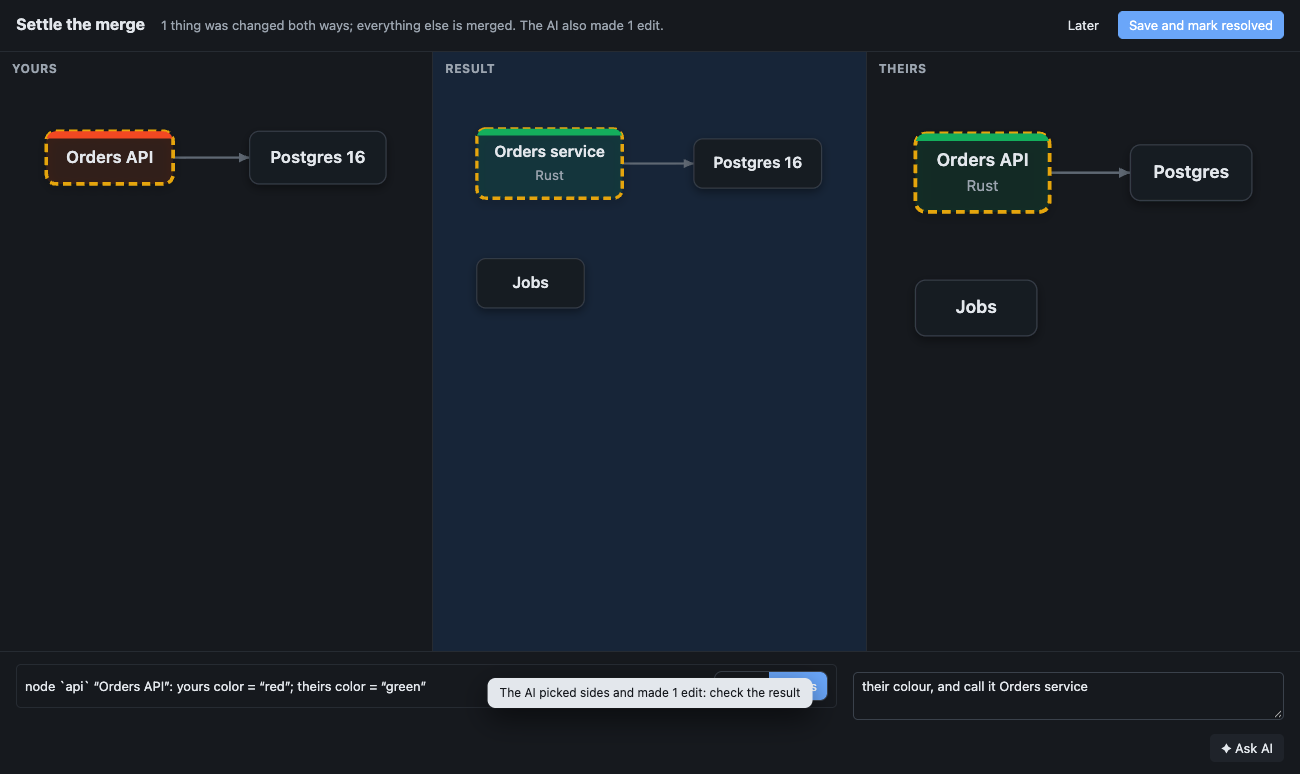
Settling a conflict in the editor: opening the board shows yours, the result and theirs side by side, with what clashed outlined in its own colours. Pick yours or theirs per conflict, or say in words what to keep: the AI (your subscription CLI) picks sides and edits where a pick alone will not do, and the result pane shows exactly what will be saved. Save and mark resolved writes the file and git adds it. A file git merged line by line, with <<<<<<< markers, opens the same way.
diagram merge BASE OURS THEIRS [-o OUT]. Core merge module (merge3, resolve, prompt, split_markers). WASM merge3, merge_resolve, merge_svg, merge_prompt, merge_answer, split_markers. Server GET /api/conflict, POST /api/resolve. Editor resolveConflict({base, ours, theirs, done}). scripts/e2e/merge.mjs (real git merges) in make e2e.
v0.28.0
Canvases inside a board:canvas payments: Payments flow { … }, written indented at the end of the parent's file, is a board of its own: boxes, blocks, comments, images, and canvases of its own. A box with canvas: payments is the way in. Its shape is how the link looks: a button (pill, the default), a card (box), text, a sticky, …. The box has a badge; double-click it or click the badge to open the canvas. The trail at the top leads back up, and the URL keeps the open canvas (?canvas=payments/fraud).
Right-click the empty board → New canvas here…. Right-click a link → Open canvas, Rename canvas…, Link style…. Deleting a link deletes its canvas, after a confirmation that says how much is inside (⌘Z brings it back). Removing a canvas removes its links.
Edits inside a canvas keep the file as written, down to the canvas's own lines. Prompts about a board name its canvases but leave their contents out; a whole-diagram reply keeps them. --canvas payments/fraud makes any CLI command (brief, apply, svg, …) work inside a canvas.
Ops: add_canvas, update_canvas, canvas on add_node / update_node. WASM: open_canvas, canvas_trail, replace_here. Editor API: openCanvas(path), canvasPath(), the canvas event. JSON: canvases, node.canvas. scripts/e2e/canvases.mjs in make e2e.
v0.27.0
Images: paste an image (a screenshot, a copied picture), drop image files on the board, or right-click the empty board → Insert image…. The box shows the picture with its label as a caption (shot: Login [image: img1, w: 328, h: 228]). The image is kept in the file as base64, on an asset img1: data:image/png;base64,… line at the end, so boxes stay readable and a diff touches one line. Big images are scaled to 1600px, and large photos are stored as JPEG.
Prompts, brief and query never include the base64: a model reads [image: img1] and a note of what images there are, and a whole-diagram reply keeps the board's images. Removing the last box that shows an image removes the image.
Ops: add_asset, and image on add_node / update_node. JSON: assets, node.image. PNG export draws the images (resvg with raster-images). scripts/e2e/images.mjs in make e2e.
v0.26.0
ER diagrams: foreign keys are drawn in crow's-foot notation, worked out from the column. At the referenced table: one, or zero or one when the column may be NULL. At the referencing table: many, or zero or one when the column is unique or the primary key. [rel: member of] names the relationship on its line. Leave out a column's type (email [unique]) for a conceptual model.
diff lists a changed relationship name. The editor's column text takes rel:. In JSON: column.rel.
v0.25.1
README: a new screenshot of today's editor (a mindmap, a kanban board, a sequence diagram and a decision record on one board), and the block keywords and cross-board links in the language summary.
v0.25.0
Sequence diagrams:sequence login: Sign in { with participants (user: User [person]) and then messages (user -> web: opens /login, api ..> web: 201 for a reply). Participants sit side by side with dashed lifelines; messages run top to bottom in the order written, straight from lifeline to lifeline, and a message to itself loops back. Messages are ordinary arrows (labels, colours, comments) and are written inside their block; an edit keeps them there.
In the editor: a Sequence diagram tool (a request and its reply); connect two participants to add a message; right-click a message → Move up / Move down; drag a participant sideways to reorder; Add participant. Ops: add_group with sequence, update_edge with index (a message's place).
Prompts and brief list the participants and the numbered messages; query kind:sequence; examples/sequence.diagram; scripts/e2e/sequence.mjs in make e2e.
v0.24.0
Decision records:adr db: Use Postgres for orders [accepted] { with one field per line (context: …, options: …, decision: …, consequences: …, or any names). Drawn as a card: the status in a coloured pill (proposed, accepted, rejected, superseded, deprecated), then each field's name over its text. Fields are elements (db.context): comment on one, link to it, draw an arrow from one record to another (supersedes).
In the editor: a Decision record tool; right-click a record → Status…, Edit as text…, Add field; a field → Edit text…, Rename field (its id follows), Colour…, Delete field. Ops: add_group / update_group with adr (the status); fields are nodes with detail. Prompts list the fields in bold; query kind:adr.
Charts, tables, database tables and decision records share one path (Group::plotted, charts::plot_any). examples/decisions.diagram; scripts/e2e/adr.mjs in make e2e.
v0.23.0
Kanban boards:kanban sprint: Sprint 12 { with column todo: To do { … } inside; cards are boxes, stacked in the order written, all as wide as the widest; each column's title shows its card count. It is swimlanes laid out as columns ("lanes": true, "kanban": true in JSON), so moving, colouring, comments and arrows work as before.
In the editor: a Kanban tool (To do / Doing / Done, the selected boxes in To do); drag a card to another column or another place in its column (update_node with group and index); right-click a column → Add card, Add column after, Remove column.
Prompts list each column with its cards; query kind:kanban; examples/kanban.diagram; scripts/e2e/kanban.mjs in make e2e.
v0.22.0
JS package:source() and prompt() get their errors as data from the WASM side (source_result, prompt_result: {ok, text} or {ok: false, error}) instead of looking for an error: prefix in the text, and throw DiagramError.
Types stay true: a test (js/test/types.test.mjs) checks that every op in index.d.ts has the same fields, and the same required ones, as the Rust Op enum, so the types cannot drift from the format.
v0.21.0
Links between boards:link: delivery.diagram or link: ../plans/q3.diagram#m1, relative to the board. In the editor the link badge opens that board in place (the URL carries ?file=…&focus=m1, so back returns), with the element selected; pending edits are saved first. Right-click → Link to a board… lists the other boards in the repository. The local server opens only .diagram files under the board's git repository (or folder).
diagram check reports links to boards that do not exist or have no such element. Badges and prompts say where a board link goes ("Go to m1 on delivery.diagram").
Editor API: goTo(id); options openBoard(path, id) and boards(). scripts/e2e/links.mjs in make e2e.
v0.20.0
Charts ask for their type: the chart tool opens a menu (bars, lines, pie, …) and adds that chart with sample data to edit.
Outlines keep ids and colours: an add_outline line can end in attributes, Launch [id: launch, red, collapsed]; a free id is used and the rest apply one by one (a bad one is left out instead of dropping them all). Topics without an id get a short one from the label's first words (who-books-the-venue, at most four words) instead of the whole sentence. Ids in files you wrote are unchanged.
New maps in a section:add_outline takes group for a new map (diagram expand FILE --new TOPIC --in SECTION).
v0.19.0
Database tables:entity users: Users { … } with one column per line, email: text [unique], team_id: uuid [fk: teams], bio: text [null], created_at: timestamptz [default: now()]. Columns show PK / FK / UQ badges, their type and ? when nullable; a foreign key is drawn from the column to the one it references and pulls related tables together. Columns are elements (users.email): comment on one, link to it, hover it for everything about it.
Schema review:diff lists columns added, dropped and changed (type, keys, references, default); --base shows them in green, red and amber, dropped columns included. Prompts show a table as a Markdown table of its columns, and brief includes the tables.
In the editor: a Database table tool; Edit columns… (as text), Add column, Edit column…, Delete column. Ops: add_group with entity, nodes with column; query kind:entity, kind:column. examples/schema.diagram; scripts/e2e/entity.mjs in make e2e.
v0.18.0
Sections keep their place:group a: A [x: 400, y: 120] { (and the move op) places any section, not only swimlanes, charts and tables; its boxes are laid out inside it. Dragging a section by its frame in the editor now places the section instead of pinning each box in it (a section whose boxes were already placed one by one moves as before). Adding a section no longer reshuffles the ones you placed.
Find (⌘F): boxes, topics, table and chart rows, owners and sections by their text; Enter goes to the next match (⇧Enter back), zoomed in and selected.
Present: the screen icon in the toolbar shows the board's top-level sections, blocks and mindmaps one at a time in reading order; ← → or Space, Esc to stop; the toolbars step aside.
Readable when zoomed out: below 60 % zoom, top-level section titles are shown at a readable size over the board.
scripts/e2e/board.mjs in make e2e.
v0.17.0
Ask AI, on your AI subscription. In the editor, ✦ Ask AI (⌘K) takes a request about the selection or the whole board. The prompt carries just that part of the board and the ops reference; the model replies with edits; a reply that does not apply goes back with its error (twice at most); the changes are shown highlighted with Keep / Discard (nothing is saved before Keep; ⌘Z discards). Without an AI connected, the prompt is shown to copy and the reply pasted back.
diagram ask FILE "…" [--on ID,ID] [--dry-run] [--print]: the same from the command line.
--ai presets for subscription CLIs:claude (Claude Code, claude -p), claude:sonnet (a model), codex (Codex CLI), gemini (Gemini CLI); without --ai / DIAGRAM_AI, the first of them installed. Any command still works. (The default for Claude Code is now your plan's default model instead of Haiku; claude:haiku keeps it fast.)
JS: Board.askPrompt(request, ids), askAgain(prompt, reply, error); WASM ask_prompt, ask_again. scripts/e2e/ask.mjs (with a stand-in harness) in make e2e.
v0.16.0
Every theme has a light and a dark mode. A theme's top lines apply in both; light { … } and dark { … } hold what differs. A board follows the viewer's mode (the editor's light/dark switch, --dark for exports), so a team's brand theme works for everyone. Old theme id [base: dark] { … } blocks read as that mode.
The presets are back with both modes: paper, blueprint, midnight, contrast.
Edit theme… shows a theme with its two modes (and starts a new one with both); WASM theme_text(name).
v0.15.1
The dark-only presets blueprint and midnight are gone until every theme has a light and a dark mode; paper and contrast stay. Boards that named them fall back to the default theme.
v0.15.0
Themes.theme: paper | blueprint | midnight | contrast (presets), the id of a theme block on the board, or a shared file (theme: ./brand.theme). A theme brand [base: light|dark] { … } block sets background, dots, text, muted, surface, border, line, section, header, title, title-text, pin, any named colour (blue: #3b6fd8), font and radius; the rest comes from its base. Themes apply to the board, its SVG/PNG/HTML exports (a file theme is carried into the HTML) and the editor's canvas. Unknown keys and bad colours are errors.
In the editor: a theme picker in the toolbar (default, presets, the board's themes) and Edit theme… (the theme as text; a preset is copied into a new theme). The editor server sends a board's theme file along with it.
Ops: theme (add or replace a theme from its text), set theme, remove of a theme. JS: Board.addThemeFile(name, src), Board.themes(), render().canvas; WASM add_theme_file, themes, theme_preset.
Fixed: the toolbar's Direction and Edge style pickers never showed a board's own settings (the editor stored the picker in an element's built-in dir).
scripts/e2e/themes.mjs in make e2e.
v0.14.0
Tables:table id: Title { … } with a header row and rows of cells separated by |. Columns line up in the file; long cells wrap on the board; a colour tints a row. Rows are elements named in their table (options.local): comment on a row, link to it, point arrows at it, hover it for its cells by column. Prompts show tables as Markdown.
In the editor: a Table tool; right-click a table → Edit as text…, Add row, Add column; right-click a row → Edit row…, Add row below, Colour…, Delete row. A row whose label changes gets the matching id (comments and links follow); renaming a table renames its rows.
index places any member of a group (table and chart rows, gantt tasks, boxes in a section), not only mindmap topics. Add task after now puts the new task right below the one it follows (it used to append it at the end).
Ops add_group/update_group take table and columns, nodes cells; query kind:table, kind:row. examples/tables.diagram; scripts/e2e/tables.mjs in make e2e.
v0.13.0
Charts:chart id: Title [bar|line|area|pie|donut|scatter] { … } holding a small table (quarter | EU | US, Q1 | 120 | 80, or Jira 45). Bars side by side, stacked or horizontal; lines; stacked areas; pie; donut with the total in the middle; scatter (label | x | y). Axes with round ticks, a legend for several series, unit: (k€, %, $ in front), w:/h:. Rows are nodes named in their chart (revenue.q1): point arrows, comments and links at a bar or a slice; hover for its values; a colour on a row colours it.
In the editor: a Chart tool; right-click a chart → Edit data… (the table as text, rows keep their ids), Type…, Stacked, Horizontal bars, Unit…; right-click a row → Values…, Rename, Colour…, Delete. Dragging a bar moves the chart.
Prompts show charts as Markdown tables (pies with each slice's share); ops add_group/update_group take chart, stacked, horizontal, unit, series, axis, and nodes values; query kind:plot, kind:row. Renaming a chart renames its rows. examples/charts.diagram; scripts/e2e/charts.mjs in make e2e.
⌘S in Arc: the editor saves on its own; in Arc it no longer takes ⌘S, so Arc's sidebar shortcut works (other browsers still get "saved" instead of the browser's Save page).
v0.12.0
Gantt forecasts. As of today, an unfinished task that has started is forecast to take until today plus the part not done yet (by its done), and what waits for it moves with it, also in other charts and past fixed start dates. Charts draw a slip as a red dashed extension with +5d, and a hollow diamond where a milestone will now land; the timeline grows to fit. The editor shows it live; exports take --today or --as-of DATE.
diagram schedule FILE [CHART] [--as-of DATE] [--json]: every task's planned and forecast dates and status (done, late, behind, in progress, pushed back, upcoming).
Prompts and brief with a date (--today, --as-of; Copy as prompt in the editor uses today) add forecast end 2026-10-26 (+5d, behind) to tasks.
diff (and what apply prints) lists the milestones and chart ends a plan change moves: milestone m1 moves 2026-10-17 → 2026-10-19 (+2d).
Free text keeps its commas, and mistakes are errors.[detail: fast, opinionated, red] reads as the detail "fast, opinionated" and the colour red (also ;, and in label, resolution, owner). Brackets that start like attributes but don't read as them ([shape: box, opinionated]) are now an error with the line, instead of silently becoming part of the label (models hit this constantly).
Keywords are ids outside their statements:gantt -> b, risks -- b, comment -> x are arrows again; group, gantt, risks and mindmap only open a block on a line that ends with {.
prompt --context auto|near|section|all: a prompt about comments shows only what they are about on a big board (auto: the whole board up to 60 lines, else the commented sections; near: the commented blocks and their neighbours), and tells the model the rest exists. On a 300-element board one comment's prompt went from about 24k to 6.7k characters. Also in the WASM/JS prompt options and used by the editor.
Diff: risk ratings and matrix size changes show up (and are highlighted with --base); title changes keep their case; description changes are listed.
v0.10.0
Risk matrices:risks id: Title [scale: 5] { … } with one risk per line, Label [p: 4, i: 3, owner: ana, detail: "…"]. Drawn as a probability × impact grid with cells tinted by severity (low, medium, high, critical), each risk a numbered dot in its cell, and a list of the risks with their scores beside it; unrated risks wait in the list. Hover a dot or a row for its rating, owner and description.
In the editor: a Risk matrix tool; drag a dot to another cell to re-rate it (off the grid clears it); right-click a risk → Probability…, Impact…, Description…, Owner…, Rename, Delete (also on its row in the list); right-click the matrix → Add risk, Size… (3×3, 4×4, 5×5).
Prompts list risks worst first (… = 16 (critical), owner ana — description), brief includes them, query knows kind:risk and kind:matrix; ops add_group (risks, levels), update_group (levels), add_node / update_node (probability, impact). JS types updated.
examples/risks.diagram; scripts/e2e/risks.mjs (part of make e2e).
v0.9.0
Tools for agents that drive boards:
diagram add FILE [DSL|-] and the merge op: statements in the diagram language added to a board as if written at its end. New elements are created; one written again by its id gets the attributes given (api [red]); a group written again keeps its place. The cheapest way for a model to add a lot at once.
diagram query FILE SELECTOR…: just part of a board, as diagram language with the sections around it: group:/chart:, map:, near:, label~, kind:, owner:, tag:, color:, comments:open (--ids for ids). Also Board.query() / Board.select() in the JS package and query() in WASM.
Inline ops:diagram apply FILE '{"op":…}'.
--focus ID,ID crops svg/png/html (and the focus render option) to some elements.
"Did you mean …?" on ops with a mistyped id.
diff (and the summary apply prints) now shows changes to gantt tasks and charts (dates, durations, dependencies, milestones, progress, owners, scale) and topic moves.
Board.merge(dsl) in the JS package.
v0.8.0
JavaScript / TypeScript package in js/ (make js): an ES module for Node ≥ 18 and browsers with index.d.ts types. await init(), then Board.parse(src) / Board.empty() with apply(ops | {ops} | model reply) (atomic; throws DiagramError with the failing op's index), source(), document(), render(), prompt(), brief(), outline(), markdown(), selection(ids), diff(base), expandPrompt(); one-shot parse, render, convert, spec, jsonSchema, version, mindmapPrompt, replyOutline. Objects in and out, camelCase options; Op is a typed union of every op. make test runs its tests once js/pkg is built. Marked private for now: the npm name diagram is taken.
The WASM markdown(id) returns an empty string for an unknown id again.
v0.7.0
Edits keep the file as written. Ops, the editor, diagram apply (also a whole ``diagram reply), comment, reply and resolve rewrite only the statements whose elements changed, put new statements next to their kind (a box inside its section, an arrow after the last arrow, a comment after the comments) and leave every other line, blank line and # note alone. A chain like web, mobile -> cdn -> gw is split only when one of its arrows changes; a renamed box keeps its line; a changed mindmap or gantt chart is rewritten as a block. The result is read back before it is written, and the whole file is reprinted only when the edit can't be placed (e.g. moving a section into another one). A 6-op edit of a 60-line board now changes 10 lines instead of 40. diagram fmt` still reprints everything.
v0.6.0
Milestones:[milestone] makes a task a point in time, drawn as a diamond on its day (right-click → Make it a milestone).
Progress:done: 60% (or done) shades the part of the bar that is done and shows 5d · 60% / 5d ✓ (right-click → Progress…).
Owners:owner: ana shows next to the task's name (right-click → Owner…).
Today: a red line marks today on dated charts in the editor and its exports (--today for diagram svg|png|html).
Dependencies between charts: a task can wait for a task in another chart (draw an arrow between them, or after: its id); the line is dashed and runs along the row line, clear of the task names. Both charts need dates.
Task names are per chart:after: design means this chart's Design, even when another chart's Design took the id design (it used to link the other chart's task). chart/task names a task of another chart when this one has one of the same name.
Prompts list milestones, progress and owners: Build: 2026-10-12 → 2026-10-16, 5d, 60% done, owner ana. The ops reference for models now covers gantt charts.
v0.5.0
Links pull in what they point at: in Copy as prompt (and outline --md, markdown()), a block with link: #id reads "label (see “Target”)", and the target (swimlanes, a gantt chart, a section, a mindmap or a single block with its arrows) follows as a section headed "— linked from “label”". Links inside it are followed too (up to 8 blocks), and nothing is repeated. Web links stay Markdown links.
Swimlanes as numbered steps: prompts list the steps in the order the flow runs, each with its lane; decisions are marked, and where a step does not just lead to the next one its arrows name the step they go to (yes → 5. Confirm order).
Gantt tasks with end dates in prompts: Design: 2026-10-12 → 2026-10-16, 5d.
Shorter brief:diagram brief is now the title and counts, gantt dates and swimlane steps (what the source doesn't spell out), then the source with every id and comment. It used to list every node and arrow and then repeat them in the source (about half the size now on an architecture board), and it ignored gantt charts.
v0.4.2
Colour from the right-click menu:Colour… on a gantt task (its bar), a box, an arrow, a section or a lane, and Branch colour… on a mindmap topic. Until now colours could only be set in the hidden inspector panel or in the file.
v0.4.1
Gantt drag preview: while you drag a bar, it snaps to where it will land and the tasks after it move along; a label above it shows its dates (Sat 17 Oct – Wed 21 Oct · 5 days). Dragging the end of a bar shows the same label. Dragging a bar out of its chart shows it leaving.
v0.4.0
Gantt scale:scale: day | week | month | quarter on a chart (right-click it → Scale…). Lines and dates at each day, Monday, month or quarter; month and quarter labels carry the year when it changes. Durations also take 1m (30 days) and 1q (91 days), and are written that way when they divide evenly.
Task durations in the editor: drag the end of a bar (snaps to a day; a week on the month scale, 30 days on the quarter scale), or right-click → Duration… and type 5d, 2w, 1m, 1q. Duration… replaces Longer / Shorter.
Dependencies in the editor: draw an arrow from one bar to another (the dot past the end of a bar, or Connect X) and the second task starts when the first ends (after:), instead of an arrow. Loops are refused. Right-click a dependency line → Remove dependency, or a task → Starts after… to tick the tasks it waits for.
Links between elements: right-click a block → Link to…, then click the element it should take you to (link: #id). Linked blocks get a link badge; clicking it pans and zooms to the target and selects it (a web link opens in a new tab). Remove link takes it off. Exports keep web links clickable.
v0.3.3
The open file's name sits at the right of the top bar, next to Saved (notes.diagram · Saved).
v0.3.2
Move swimlanes and gantt charts: drag them by their frame, title or a lane (or nudge with the arrow keys); they keep their place. Saved as x/y on the lanes or gantt line, which the move, nudge and unpin ops now handle. Inside, they are still laid out automatically.
Deleting a section deletes what is in it: Delete on a section, swimlanes, lane or gantt chart removes it with its blocks, lanes and tasks, and the arrows to them; right-click → Delete does the same. Remove section / Remove lane / Remove chart still keep the blocks. Remove swimlanes now removes the lanes too instead of leaving them as sections.
Fixed: removing a group with its contents failed when it held a mindmap, and left arrows to the lanes inside it dangling.
v0.3.1
Copy any selection as a prompt: right-click a block, section, swimlanes, gantt chart or a multi-selection → Copy as prompt (or ⌘⇧C). Markdown with the board's title, the blocks as bullets under their sections' headings (gantt tasks with dates and durations), then the arrows between them and their open comments. Right-clicking a multi-selection also offers Put in a section and Delete. Core: prompt::selection; WASM: selection_markdown(ids).
Mindmap prompts: main branches are ## sections only when every one of them has topics or a detail under it; otherwise the map is one nested list under the title (a shopping list stays a list).
New mindmaps keep opening to the right.
v0.3.0
Flowcharts, swimlanes, gantt charts and comments on the board; a simpler editor that looks like schema; tidier mindmaps.
Comments: C (or the Comment button) is comment mode, with a speech-bubble cursor. Click a block to comment on it, or anywhere on the canvas for a free comment; a comment box opens where you clicked. Pins open their thread in a popover: reply, resolve, delete.
Flowcharts: a Decision tool (D, a diamond) next to Box. Right-click a box → Rename, Shape… (all 13 shapes), Delete; right-click an arrow → label, dashed / solid, reverse, delete. Connect moved to X. update_edge with new ends keeps an automatic id (a->b) in step, comments included.
Swimlanes:lanes id: Title { lane a: A { … } … } (a group with "lanes": true). Lanes are bands (rows when the flow runs right, columns when it runs down) with their titles at the side; everything in them is ranked together, so the flow lines up across lanes. In the editor: the Swimlanes button (selected blocks go in the first lane), drop a block into a lane to move it there, right-click a lane to rename it, add one after it or remove it.
Gantt charts:gantt id: Title [start: 2026-10-12] { Design [5d] Build [2w, after: design] … } (a group with "gantt": true; tasks are nodes with start, days, after). Drawn as a timeline: week dates, task names, bars and dependency arrows. In the editor: the Gantt button (a chart starting today), drag a bar to reschedule it, right-click a task to make it longer or shorter or add one after it.
Layout: every level of a side lines up in one column (one row in org charts), so sub-topics sit at the same distance whatever the width of their branch, and each fan of sub-topics is centred on the branch it grows from. Subtrees reserve only the space they use above and below, so maps stay compact.
Placed by hand: drop a topic on empty canvas and it stays there (saved as x/y relative to the map's centre); its branches follow it and grow away from the centre, and its siblings close up. The move op now works on topics.
Reset:Auto-place (one topic) and Reset arrangement (the whole map) in the topic inspector put topics back in the automatic layout; Tidy up still resets everything.
Editor, simpler: the code pane and the inspector / comments panel are off for now (code: true / panel: true, or ?sidebars in the local editor, bring them back). The Prompt and Compare buttons are gone from the toolbar.
Floating tool bar at the bottom centre: Select (V) and Hand (H), then the blocks: Mindmap, Box, Sticky, Connect.
Context menus: right-click a mindmap topic → Copy as prompt copies that topic and everything under it as Markdown.
Title: double-click the board's title on the canvas to rename it.
Design aligned with schema: schema's colours, control sizes, radii, menus, toasts, zoom control and top bar, in the editor and in rendered SVG / PNG (canvas, cards, edges, diff colours, comment pins).
Sections: the Section button in the tool bar (or ⌘G) puts the selected blocks in a titled section (a group); drop a block into a section to add it, drag it out to take it out; right-click a section to rename or remove it.
No title on the board:title: is metadata now (briefs, export names). It is not drawn; --title draws it in exports. New files start without one.
Mindmaps: right-click a topic → Add parent (⇧Tab on the centre): a new topic above it; above the centre it becomes the new centre. Branches are spaced symmetrically, so a middle branch runs straight out.
Fixed: an undo within the autosave delay was overwritten by the pending save.
The logo no longer links to the repo.
diagram with no FILE starts a new untitled.diagram (untitled-2.diagram, … when taken) instead of reopening diagram.diagram.
v0.2.0
Mindmaps, as the first FigJam-style building block of the board.
Language:mindmap id: Topic [layout: right|left|both|down] { …indented outline… }. Topics are ordinary nodes (parent in JSON), so comments, ops, diffs and cross-links work on them. Folding ([collapsed]), branch colours, Markdown bullets in the outline.
Layout and look: tidy-tree layout per map, balanced (both) and org-chart (down) maps. The centre is a pill, main branches are outlined cards, sub-topics sit on coloured underlines and curved branches. A map is one block on the board, next to boxes and stickies.
Editor: T places a map; Tab / Enter / ⇧Tab / F2 / arrows / ⌥↑↓ / . to outline by keyboard; + and fold controls; drag a topic to reparent or reorder; paste a Markdown list; copy a branch as an outline (⌘C) or a map as a Markdown prompt.
AI with few tokens: ✦ Grow this topic and ✦ Mindmap about… send an outline-sized prompt and read an outline back. Pluggable: ai(prompt) option in the editor, --ai CMD / $DIAGRAM_AI for the CLI and the local server (default claude -p --model haiku when installed); without a harness the prompt is shown to copy.
Ops:add_outline; parent / index / mindmap / collapsed on add_node and update_node; removing a topic removes its branch (keep_members lifts it).
CLI:diagram outline FILE [ID] [--md], diagram expand FILE ID [--ask …] and --new TOPIC.
Mermaid:mindmap diagrams import and export.
New agent skill diagram-mindmap.
v0.1.1
Visual polish from the stress test: group title pills, dotted canvas background, soft shadows, refreshed theme colours. Fixed invalid SVG (duplicate stroke-width) when diffing added or changed groups. Stress-test examples and report in examples/stress/.
v0.1.0
First release: DSL, JSON and Mermaid formats, ops API, layered/grid layout with groups, SVG/PNG/HTML export, browser editor with comments, comment-to-prompt and reply application, git-aware diffs, embed bundle, Rust crate and agent skills.
Your next kick-off, on one board.
Open the playground, paste the notes from your last meeting and press ✦.
 shape
shape